
A new pre-release update has been released for Rabbid MultiTool Vita , a small utility for PlayStation Vita and PlayStation TV consoles that allows you to perform various operations on the console’s database.
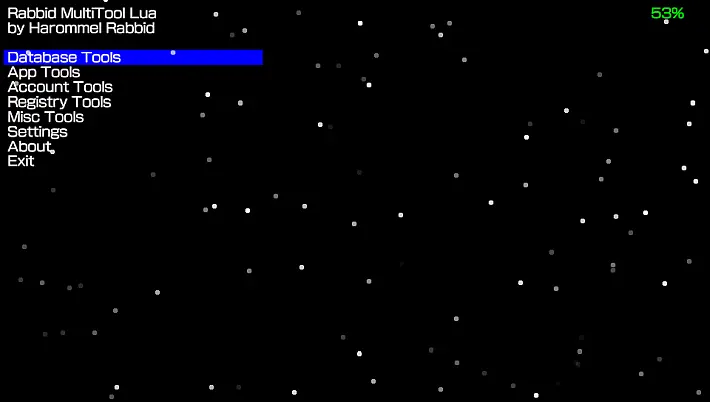
Among the main features, the tool allows you to update and rebuild the database , backup and restore the layout of icons and applications , thus ensuring a personalized organization and easy recovery in case of need.
This new version introduces a file manager, fixes a significant bug, and makes improvements to the user interface.
Characteristics
Database Tools
- Back up app.db – Backups the app database, useful for restoring bubble layout.
- Restore backed up app.db : Restores the previously saved app database.
- Update database : Starts a database update. This removes custom themes, which will need to be reinserted via a theme manager. Official themes are not affected and will remain intact.
- Rebuild database – Starts rebuilding the database. This temporarily erases the bubble layout, which can be restored using the app database backup/restore option.
- Import Media – Imports media into the database, making it accessible via system media apps.
App Tools
- Once you select the option, you will be shown a list of all installed apps, system applications present in the app database, and official PSP/PS1 bubbles (excluding those created with Adrenaline ).
- You can add a custom icon and LiveArea images to an app within the specified folder.
- At the moment, this feature is not yet available for system applications .
Account Tools
- Show account info : View your PSN account details , such as your ID and password.
- Back up PSN account : Backs up your current PSN account to a folder named with your current account ID.
- Restore PSN account : Restore or change an account using backups created with Rabbid MultiTool .
Registry Tools
- Reset parental passcode : Resets the parental control code , useful if you purchase a PS Vita with restrictions active and settings left by the previous owner.
- Reset screen lock passcode : Resets the screen lock passcode, allowing you to access the LiveArea directly without having to enter it.
- Modify a registry key : Allows you to change a key in the registry to the desired value.
Settings
- Show icons in app list : Enable or disable icon preview in the app list within App Tools . It is recommended to disable this option, as enabling it may cause lag issues, system freezes , and in some cases, C stack overflow errors or GPU crashes .
Other additions
- Auto-update is now available , allowing you to update directly from the app. This feature is available from version 0.10 onwards, while versions 0.09 or earlier must be updated manually, as they do not support auto-update. The code for this feature comes from other official OneLua apps .
Changelog
- Added a file manager, fixed a significant bug, and improved the user interface.
Download: Rabbid MultiTool Vita v0.12pre2
Download: Source code Rabbid MultiTool Vita v0.12pre2
Source: github.com