
A new pre-release update for ShaderGlass has been released , the tool developed by developer mausimus that allows us to apply GPU shaders to any window on the Windows desktop.
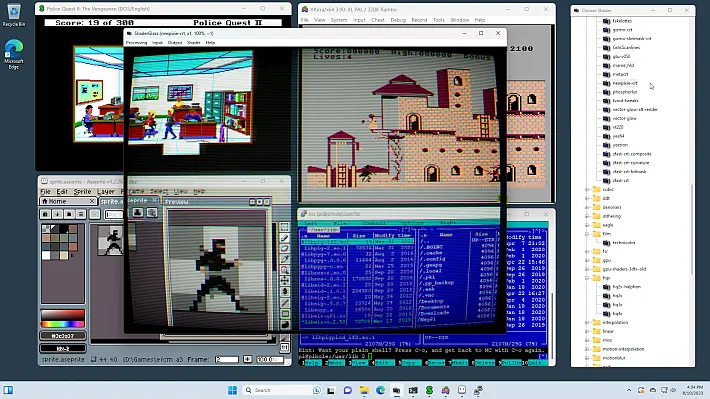
This tool is especially useful for gaming, pixel art and video , offering an advanced overlay that can enhance the visual appearance of emulators, retro platforms and even modern applications like YouTube, Twitch and recent games .
ShaderGlass also includes a large library of shaders from RetroArch , allowing you to simulate CRTs, sharpen images, apply upscaling effects, reduce noise and add TV/VHS effects.
The program is compatible with several emulators and retro software such as DOSBox, FS-UAE, Altirra, ScummVM, AGS, VICE and Aseprite , making it particularly useful for drawing pixel art .
Please accept cookie consent
With this update HDR support has been introduced in the “Processing -> Advanced” section, and now ShaderGlass can also work without an active capture API, making it usable even via Wine (configured to use the Vulkan renderer).
Additionally, the shader library package has been updated. The developers invite users to provide specific feedback on HDR support via issue #121 of the project.
Characteristics
- Apply shader effects above your desktop, either in a floating window or full screen.
- Includes a built-in library of RetroArch shaders (over 1200 shaders!) covering:
- CRT monitor simulation.
- Image upscaling.
- Simulation of TV, VHS and portable consoles.
- Softening, noise reduction, blurring, sharpening and many other effects
- Works with most emulators, retro platforms and pixel art editors, including:
- Excellent companion for pixel art, allowing you to view previews with shaders applied and/or aspect ratio correction.
- It can also be used on top of YouTube, Twitch or modern games.
- Supports saving and loading custom profiles.
- Allows importing external shaders in
.slangp/.slang. - It offers a high level of customization thanks to numerous options, operating modes and configurable shader parameters.
- It can be captured from OBS using the “Game Capture” source.
Changelog
- HDR support (in Processing -> Advanced ) by @EndlesslyFlowering
- Ability to run the program without capture API (i.e. in file input mode); this makes it possible to use it under Wine (by setting Wine to use the Vulkan renderer).
- Shader library update .
Thanks everyone for testing! Please send any feedback on HDR support in issue #121 .
Download: ShaderGlass v1.1.3
Download: Source code ShaderGlass v1.1.3
Source: github.com
Dịch Vụ Chép Game Tại TP.HCM – Hỗ Trợ Tất Cả Quận
Chép Game Ổ Cứng Ngoài Giá Rẻ – Hỗ Trợ PS, Xbox, Nintendo, PC
Dịch Vụ Chép Game PSP Giá Rẻ – Game Việt Hóa Cập Nhật Mới Nhất
Dịch Vụ Chép Game PSVITA Giá Rẻ – Game Việt Hóa Cập Nhật Mới Nhất
Dịch Vụ Chép Game PS2 Giá Rẻ – Game Việt Hóa Cập Nhật Mới Nhất
Dịch Vụ Chép Game NINTENDO SWITCH Giá Rẻ – Game Việt Hóa Cập Nhật Mới Nhất
Dịch Vụ Chép Game PS5 Giá Rẻ – Game Việt Hóa Cập Nhật Mới Nhất
Dịch Vụ Chép Game XBOX 360 Giá Rẻ – Game Việt Hóa Cập Nhật Mới Nhất
Dịch Vụ Chép Game PS3 Giá Rẻ – Game Việt Hóa Cập Nhật Mới Nhất
Dịch Vụ Chép Game PS4 Giá Rẻ – Game Việt Hóa Cập Nhật Mới Nhất
Dịch Vụ Chép Game PC Giá Rẻ – Game Việt Hóa Cập Nhật Mới Nhất