
A new update has been released for Checkpoint , the popular tool for backing up and managing save states on Nintendo 3DS and Nintendo Switch consoles .
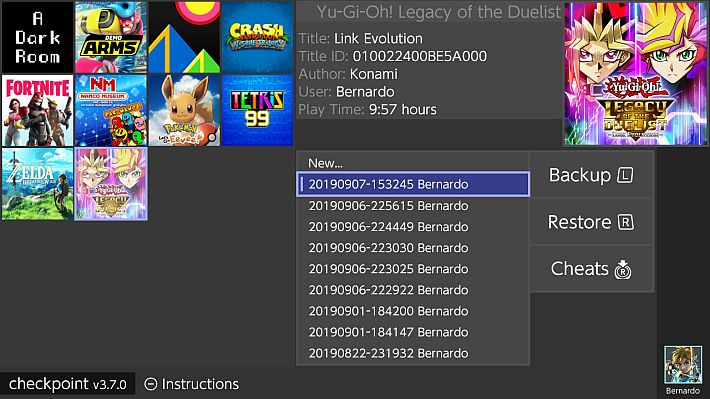
The update fixes a historical bug that prevented 3DS save backup folders from being properly supported when they were archived, hidden, or set to read-only. Additionally, an issue that prevented some on-screen text from displaying properly has been fixed.
New features include the integration of the latest version of the Sharkive cheat database and a series of improvements to the overall stability of the system, designed to offer a more solid and reliable user experience. Those who wish to contribute to the development of the project are invited to submit a pull request.
Work paths
Checkpoint uses the following folders to store generated files. Note that all directories are automatically generated on first launch (or when Checkpoint finds a new title that doesn’t have a directory yet).
3DS
sdmc:/3ds/Checkpoint: root path.sdmc:/3ds/Checkpoint/config.json: custom configuration file.sdmc:/3ds/Checkpoint/saves/<unique id> <game title>: root path for all save backups of a generic game.sdmc:/3ds/Checkpoint/extdata/<unique id> <game title>: root path for all external data backups of a generic game.
Switch
sdmc:/switch/Checkpoint: root path.sdmc:/switch/Checkpoint/saves/<title id> <game title>: root path for all save backups of a generic game.
Guide
You can use Checkpoint on 3DS consoles with homebrew launchers either through a Custom Firmware or through Rosalina. *Hax-based homebrew application launchers are not supported by Checkpoint.
Checkpoint for Switch only works on homebrew launchers, you must reboot your console after restoring a save via Checkpoint.
The first launch will take much longer than usual (1-2 minutes depending on the number of titles installed), due to the creation of the working directories – Checkpoint will be significantly faster at launch from that point on.
Optionally, you can scroll through the list of titles with the  or LR and select a title with
  when the selector is positioned over it. You can now use the or touchscreen to select a destination backup to restore/overwrite.
Important Notice: In the unlikely event that this release causes problems, please contact the team immediately and temporarily install one of the following releases:
Changelog
- Fixed: Added support for archived, hidden, or read-only 3DS save backup folders.
- This bug was in the code from the beginning. We finally fixed it.
- Fixed: A bug that prevented some text from displaying correctly on the screen.
- Added: Updated cheat database to the latest version of Sharkive .
- General system stability improvements to improve user experience.
If you would like to contribute, pull requests are greatly appreciated.
Download: Checkpoint v3.10.1 for Switch Consoles (NRO) ( ELF )
Download: Checkpoint v3.10.1 for 3DS Consoles (CIA) ( 3DSX ) ( ELF )
Download: Source code Checkpoint v3.10.1
Source: github.com
Dịch Vụ Chép Game Tại TP.HCM – Hỗ Trợ Tất Cả Quận
Chép Game Ổ Cứng Ngoài Giá Rẻ – Hỗ Trợ PS, Xbox, Nintendo, PC
Dịch Vụ Chép Game PSP Giá Rẻ – Game Việt Hóa Cập Nhật Mới Nhất
Dịch Vụ Chép Game PSVITA Giá Rẻ – Game Việt Hóa Cập Nhật Mới Nhất
Dịch Vụ Chép Game PS2 Giá Rẻ – Game Việt Hóa Cập Nhật Mới Nhất
Dịch Vụ Chép Game NINTENDO SWITCH Giá Rẻ – Game Việt Hóa Cập Nhật Mới Nhất
Dịch Vụ Chép Game PS5 Giá Rẻ – Game Việt Hóa Cập Nhật Mới Nhất
Dịch Vụ Chép Game XBOX 360 Giá Rẻ – Game Việt Hóa Cập Nhật Mới Nhất
Dịch Vụ Chép Game PS3 Giá Rẻ – Game Việt Hóa Cập Nhật Mới Nhất
Dịch Vụ Chép Game PS4 Giá Rẻ – Game Việt Hóa Cập Nhật Mới Nhất
Dịch Vụ Chép Game PC Giá Rẻ – Game Việt Hóa Cập Nhật Mới Nhất