
A quick update has been released for Ymir , the work-in-progress SEGA Saturn emulator available for Windows PC, macOS, and Linux.
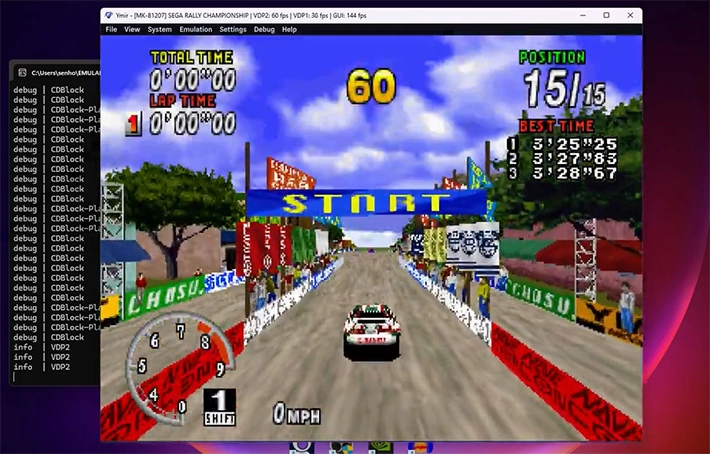
This new release, the largest yet with over 80 changelog entries, introduces numerous compatibility fixes, performance improvements, and some new features.
Among these are the portrait display mode (TATE), a basic notification system, increased frame pacing stability in full-screen mode and emulation speed control.
An important new development concerns the creation of an official compatibility list , still in the process of being completed, which invites users to test games and report their results.
Currently, over 60% of tested titles are fully playable, while a further 20% at least manage to boot, a remarkable achievement for an emulator that is less than a year old.
However, only 6% of the SEGA Saturn ‘s total library has been tested, so there’s still much to be done. Among the compatibility improvements, games like WipEout are now playable, and Rayman ‘s graphical issues , including the infamous final boss glitch, have been largely resolved.
Particular attention was paid to the SCU and VDP2 components, with numerous fixes that eliminated bugs in already working titles and allowed others to bypass the SEGA logo or black screens.
SH-2 cache emulation has also been improved, fixing issues in cutscenes in games like Dark Savior , where it is now enabled by default for greater compatibility.
VDP1 and VDP2 received many fixes, addressing graphical glitches reported by users, such as the issue in the Capcom Generation – Dai-5-shuu Kakutouka-tachi art galleries , where images would be cut off and moved.
Thanks to improved VRAM access cycle management, Ymir now displays these images correctly, a feat that few other emulations except the MiSTer Saturn core can achieve.
A debug window has also been added to monitor VRAM access delays, which is useful for more technical users. On the audio and CD front, the CUE parser has been improved to correct audio track misalignments and allow loading games extracted with non-Redump-compliant tools, as long as the tracks are in raw/binary format.
Minor fixes to CD Block, SCSP, and SMPC fixed issues such as resuming audio tracks in X-Men: Children of the Atom , cut-off sound effects in games like Sonic R and Akumajou Dracula X , and booting titles like Quake (European version).
TATE mode, ideal for shooters that require a 90° rotated screen, is one of the most interesting new features, with options to rotate the display in any direction and new screen aspect ratios (3:2 and 16:10).
We’ve also added a system to save the position and size of the emulator window, making for a smoother experience.
Performance has been optimized in several components: SH-2 cache emulation is more efficient, SH-2 interrupt controls have been simplified, and the SCSP has received micro-optimizations.
Additionally, the introduction of a dedicated thread for deinterlacing reduces the performance impact of this feature, resulting in performance losses of less than 10% in many cases, compared to 37-43% in previous versions.
Overall, the optimizations improved performance by 5-10%, with increases of up to 25% in some games.
Emulation speed control is another significant addition, with options to adjust the speed from 10% to 500% and hotkeys to toggle between normal, slow, and fast speeds.
The user interface has also been enriched with a notification system, an optional FPS counter and indicators for modified speeds.

The Backup Memory Manager now allows you to sort files, export saves in standard BUP format, and displays more detailed information about memory blocks.
Characteristics
- Loading games from BIN+CUE, IMG+CCD, MDF+MDS or ISO files.
- Automatic IPL ROM (BIOS) detection.
- Automatic region change.
- Support for up to two players with standard controllers on both ports (more options coming soon).
- Fully customizable key mapping.
- Support for backup RAM and DRAM cartridges (more coming soon).
- Built-in backup memory manager for importing and exporting saves and transferring them between internal RAM and cartridge.
- Rescue states.
- Rewind (up to one minute at 60 fps), turbo speed, frame advance (forward and reverse).
- Fullscreen mode with VRR support and low input latency.
- Feature-rich debugger under development.
User Guide
Ymir doesn’t require installation; simply download the executable file to any folder and run it. On Windows PCs, you may need to install the latest Microsoft Visual C++ Redistributable package (x86_64 version).
The program accepts command-line parameters. To view the available options, type the command ymir-sdl3 --help:
Here are the main options:
Ymir - Sega Saturn emulator
Usage:
  Ymir [OPTION...] positional parameters

  -p, --profile arg  Path to profile directory
  -h, --help         Display help text
  -f, --fullscreen   Start in fullscreen mode
With the option -p <percorso-profilo>you can specify a separate set of configuration and save files, useful if you intend to use different user profiles (hence the name “profile”).
Note: The Win32 version of Ymir does not produce console output, but still respects command-line parameters .
BIOS Requirements
To run properly, Ymir requires an IPL (BIOS) ROM, ROMs must be placed in the folder roms, which is created next to the executable on first boot.
The emulator will automatically detect and select the IPL ROM compatible with the loaded disc. If no disc is loaded, Ymir will use a ROM corresponding to the first preferred region.
If there are no matches, it will select any available ROM, you can however force selection manually in Settings > IPL .
Supported formats
Ymir can load game disc images in BIN+CUE , IMG+CCD , MDF+MDS , and ISO formats . It does not currently support MAME CHD files or direct loading of .elf.
Changelog
New features and improvements
- App: Added screen rotation options for TATE mode games. ( #256 )
- App: Added framerate OSD display with shortcuts to toggle it and change its position.
- App: Added actions in the menu to resize the window to specific scales.
- App: Added new forced aspect ratio options: 3:2 and 16:10.
- App: Added option to remember window position and size. ( #4 )
- App: Added save states to the File menu.
- App: Introduced a simple message overlay system for basic notifications. ( #288 )
- App: Displayed emulation speed in the title bar and under the speed indicator, with a new indicator for slow motion mode. (#16)
- App: Improved fullscreen frame pacing with active waiting up to 1ms before presenting a frame.
- App: Added timestamp to save states.
- App: Notifications for loading/saving states and changing slots.
- App: Improved fullscreen frame rate adjustment.
- Backup Manager: Default export of BUP files as “Vmem”.
- Backup Manager: All columns are now sortable.
- Backup Manager: Show logical usage of blocks + header blocks. ( #294 )
- Debugger: Added basic window for inspecting VDP1 registers.
- Input: Added new framerate control shortcuts: increase/decrease speed, toggle between primary/alternate speed, reset speed. (#16)
- Input: Changed default Pause/Resume shortcuts from “Pause, Ctrl+P” to “Pause, Spacebar”.
- Input: Removed Enter key from Port 1’s Start key defaults (avoids conflicts with Alt+Enter).
- SCSP: Various micro-level optimizations.
- Settings: Added “Clear All” button to controller configuration. ( #288 )
- Settings: Automatically create or suggest backup RAM files if no path is specified for the cartridge.
- SH2: Improve cache performance by avoiding byte swapping.
- SH2: Improve performance by simplifying interrupt controls.
- System: Memory area mapped
030'0000-03F'FFFF. - System: Mapped simple arrays directly as pointers in the Bus structure, improving overall performance.
- VDP2: Added dedicated thread for deinterlaced rendering, significantly reducing performance impact on quad-core CPUs or higher.
- Video: Implemented framerate limiter. ( #16 )
Corrections
- App: Disabled synchronization between emulator threads and GUI outside of fullscreen. Fixes slowdown on displays with refresh rates below 60Hz.
- App: Fixed frame pacing and speed limiter on 50 and 60 Hz displays.
- CD Block: Fixed “no change” parameter in PlayDisc. Fixes CDDA audio not resuming in X-Men: Children of the Atom . ( #274 )
- Debugger: Indirect SCU DMA traces used updated table address.
- Input: Fixed issue with non-binding key combinations.
- Input: Modifier keys now function properly as input controllers and no longer interfere with other commands. ( #282 )
- Media: Support for CUE files with PREGAP and INDEX 00 in the same TRACK.
- Media: Pre-ap silence detection ignored; CUE trusted.
- Media: Skip blank lines in CUE files.
- State saves: Added read/write capability for a missing SCSP field. Fixed sporadic crashes with buffer rewind enabled.
- SCSP: Used EG level instead of total for MSLC readouts. Fixes missing/cutting sound effects in Sonic R , Akumajou Dracula X , and Daytona USA CCE .
- SCU: Allow DSP RAM read/write even when program is paused ( @celeriyacon ).
- SCU: DSP RAM reads return 0xFFFFFFFF if program is running ( @celeriyacon ).
- SCU: HBlank IN DMAs should not depend on timers. Fixed static background in Shinobi-X . ( #193 )
- SCU: Improved handling of HBlank IN, VBlank IN and OUT interrupts.
- SCU: Increased DMA source address by 4 after unincremented transfers. Fixed background priority issues in Street Fighter – Real Battle on Film . (#168)
- SCU: DSP DMA transfers must not write to program RAM or access the CT DMA ( @celeriyacon ).
- SCU: Restructured DMA transfers. Fixed moved tiles in Steam-Heart’s . ( #278 )
- SCU: All pending DMAs executed, not just the one with the highest priority.
- SCU: Separate interrupt handling between MSH2/SSH2.
- SCU: Fixed various issues with DMA transfers to DSP program RAM. ( @celeriyacon )
- Settings: Reversed IPL column sort order.
- SH2: Fixed LRU cache update mask. Fixed FMV glitches in Capcom games, WipEout , Mr. Bones . ( #202 , #247 , #270 )
- SH2: TAS.B reads must bypass cache.
- SH2: nIVECF pin is disconnected: no external interrupt fetch.
- SMPC: Delayed commands to allow Quake (EU) to launch at 2x.
- SMPC: Improved PAL/NTSC switching to match region code.
- System: Perform hardware reset only if SMPC area code changes.
- System: Improved synchronization between SCU and SH-2 CPU. Improved stability on WipEout (USA) . ( #202 )
- VDP1: Doubled the horizontal blanking area for low-resolution sprites with 8-bit data. Fixed an options menu issue in Resident Evil . ( #180 )
- VDP1: Extended line clipping to left and top edges.
- VDP1: Fixed final code for 64- and 128-color sprites. Fixed white outline in Scud and broken sprites in Primal Rage . ( #268 , #280 )
- VDP1: Introduced delay in VDP1 command on VRAM writes. Fixed broken sprites in Mega Man X3 . ( #244 )
- VDP1: In half brightness mode, including the MSB bit of the color. Fixed FMV background in Crows – The Battle Action . ( #107 )
- VDP1: Masked CMDCOLR bits 0..3 in 4bpp sprite mode. Fixed palette issues in Steam-Heart’s , Dragon Ball Z – Shinbutouden . ( #69 , #278 )
- VDP1: Fixed DIE/DIL handling in interlaced mode. Fixed doubled text in Resident Evil . ( #180 )
- VDP2: Fixed character data offset in RGB 8:8:8 format. Fixed FMV in Crusader – No Remorse . ( #108 )
- VDP2: Pattern name delay calculated only on first login. Fixed UI shift in Battle Arena Toshinden Remix . ( #306 )
- VDP2: Applied special color calculations on bitmap BGs. Fixed translucent UI in The Story of Thor . ( #152 )
- VDP2: Prevented video parameter updates when the screen is disabled. Fixed a black screen in Sega Rally .
- VDP2: Fixed special pixel priority function. Fixed BG priority issue in Waku Waku Puyo Puyo Dungeon .
- VDP2: Fixed single-density interlaced mode.
- VDP2: Fixed rotating sprite layer. Fixed incorrect scrolling in Hang-On GP , Highway 2000. ( #167 , #208 , #277 )
- VDP2: Fixed VDP1 color data transparency handling. Fixed graphical issues in Rayman , Bubble Bobble . ( #262 )
- VDP2: Fixed window break logic. Fixed issues in Final Fight Revenge , Sakura Taisen . ( #104 , #253 )
- VDP2: Halved sprite layer width for low resolution VDP2 mode. ( #180 )
- VDP2: Fixed incorrect parameter handling in Snatcher (“Act 1”). ( #259 )
- VDP2: Respected TVMD.BDCLMD when display is off. Fixed transition effects in Sega Rally .
- VDP2: Ignore vertical scroll readouts on disabled NBGs. Fixed wave effect in Cotton 2. ( #255 )
- VDP2: Implemented VRAM bitmap delay. Fixed cut images in Capcom Generation . ( #254 )
- VDP2: Updated BG scroll registers before (VBlank OUT). Fixed vertical offset in Shinobi-X . ( #193 )
- VDP2: Fixed reading of first vertical scroll value on BG bitmap. Fixed offset in Street Fighter – Real Battle on Film . ( #291 )
- VDP2: First read value does not change address. Fixed offset in Rayman (first boss).
- VDP2: Updated linear scroll address to Y=0. Fixed graphical glitches in Rayman , Sonic Jam .
- VDP2: Linear scroll offsets updated only at the limits. Improved performance and display fixes in Sega Rally .
- VDP2: Vertical scroll updated every 8 cell dots when zoomed.
- VDP2: Vertical scroll registers updated correctly. Fixed BG distortion effect in Marvel vs. Street Fighter . ( #72 )
- VDP: Fixed handling of VDP1 thread flag when VDP2 threading is disabled.
- ymdasm: Fixed decoding immediate/in-RAM DMA operands.
- ymdasm: Masked and correctly translated various immediate DSP SCUs.
For x86_64 systems , the AVX2 version offers slightly better performance, but requires a processor compatible with that instruction set. Practically speaking, any Intel Core or AMD CPU manufactured in 2011 or later (and Pentium/Celeron from 2020) should support it.
If you’re unsure whether your processor is compatible or have no idea what that means, it’s generally safe to download the AVX2 version unless you’re using a very old or inexpensive PC. If you experience random crashes, try the SSE2 version .
AArch64 is also known as ARM64 . Every build for ARM includes support for NEON instructions .
For Windows versions , you may need to install the latest version of the Microsoft Visual C++ Redistributable package (it is available for both x86_64 and AArch64/ARM64). Ymir requires Windows 10 or later .
macOS versions are available for both Apple Silicon (ARM – AArch64) and Intel (x86_64) systems . Ymir requires macOS 13 Ventura or later .
Linux
- ymir-linux-AArch64-NEON-v0.1.6.tar.xz – 2.76 MB
- ymir-linux-x86_64-AVX2-v0.1.6.tar.xz – 2.78 MB
- ymir-linux-x86_64-SSE2-v0.1.6.tar.xz – 2.76 MB
MacOS
- ymir-macos-AArch64-v0.1.6.zip – 2.94 MB
- ymir-macos-x86_64-v0.1.6.zip – 3.36 MB
Windows
- ymir-windows-x86_64-AVX2-v0.1.6.zip – 3.47 MB
- ymir-windows-x86_64-SSE2-v0.1.6.zip – 3.44 MB
Source code
Source: github.com
Dịch Vụ Chép Game Tại TP.HCM – Hỗ Trợ Tất Cả Quận
Chép Game Ổ Cứng Ngoài Giá Rẻ – Hỗ Trợ PS, Xbox, Nintendo, PC
Dịch Vụ Chép Game PSP Giá Rẻ – Game Việt Hóa Cập Nhật Mới Nhất
Dịch Vụ Chép Game PSVITA Giá Rẻ – Game Việt Hóa Cập Nhật Mới Nhất
Dịch Vụ Chép Game PS2 Giá Rẻ – Game Việt Hóa Cập Nhật Mới Nhất
Dịch Vụ Chép Game NINTENDO SWITCH Giá Rẻ – Game Việt Hóa Cập Nhật Mới Nhất
Dịch Vụ Chép Game PS5 Giá Rẻ – Game Việt Hóa Cập Nhật Mới Nhất
Dịch Vụ Chép Game XBOX 360 Giá Rẻ – Game Việt Hóa Cập Nhật Mới Nhất
Dịch Vụ Chép Game PS3 Giá Rẻ – Game Việt Hóa Cập Nhật Mới Nhất
Dịch Vụ Chép Game PS4 Giá Rẻ – Game Việt Hóa Cập Nhật Mới Nhất
Dịch Vụ Chép Game PC Giá Rẻ – Game Việt Hóa Cập Nhật Mới Nhất