
A new update has been released for XBSX2 , the PlayStation 2 emulator , derived from the famous PCSX2 , designed to work on Xbox One and Xbox Series X/S consoles .
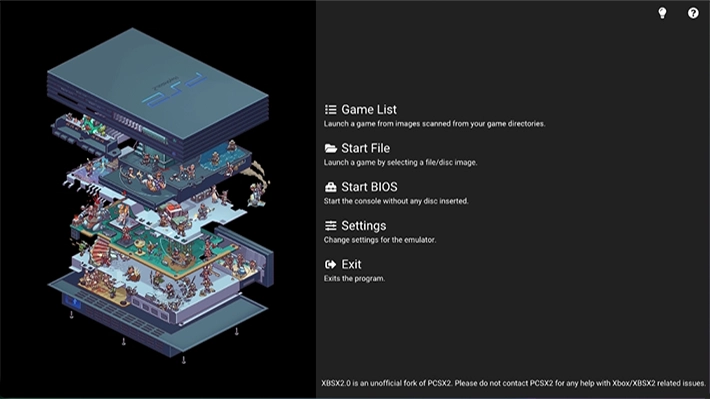
This update, synchronized with the latest PCSX2 release as of July 12, 2025, brings with it a series of improvements that make the emulation experience even smoother and more visually spectacular.
One of the most popular features of XBSX2 is the ability to upscale PS2 games to 4K resolution and beyond, delivering stunning visual quality that brings PlayStation 2 classics to life on Xbox consoles.
Titles are rendered with a clarity and detail that far surpasses the original experience, making games more enjoyable on modern displays, especially on Xbox Series X , where the hardware power allows for 60 FPS even at high resolutions. On Xbox Series S , however, it is recommended to limit upscaling to 2K (1440p) to ensure optimal performance.
The update fixes a texture dumping issue on UWP that caused corrupted or missing texture dumps, now ensuring proper functionality.
Input and audio bugs with SDL have also been fixed, improving the overall stability of the emulation. The project structure has been reorganized to better align with the upstream PCSX2 code , making the port more consistent with the PC version.
The CDVD precaching option has been reintroduced, but with a caveat: this feature can cause RAM limit issues, so use with caution.
Additionally, the emulator’s logo, which was previously too small, has been resized and accompanied by a new splash screen, improving the aesthetics of the interface.
An important aspect to keep in mind is save state compatibility. This update may make save states from previous versions incompatible, potentially leading to loss of progress if you don’t take precautions.
It’s highly recommended that you save your progress to a virtual memory card before updating to avoid issues. This is crucial for those who use save states as their primary method of preserving game progress.
Improvements made to the original source code
- Backported from PCSX2 to both GameDB and various backend tweaks, this led to some improvements such as Spider-Man games now running with Hardware Renderer (don’t get too excited, they crash after a couple of minutes).
- Lots of changes to UI elements, the settings page has been heavily reworked so that the placement of most options makes more sense, it also has a directory settings tab where you can set directories wherever you want.
- Made some changes to the control scheme, I’d recommend showing the little question mark bubble in the top right of the main menu, but essentially LB/RB can be used to jump between Game List entries, pressing Start on an entry opens the Game Properties menu, and the Back button returns you to the main menu instead.
- Fixed looping settings issue caused by 2 options with the same name.
- Changed the default font used by the app to one that users should be more familiar with.
- Changed the way most OSD elements are displayed, the FPS counter no longer has [G] and [V], the FPS now only shows the game’s internal FPS instead.
- Changed the language used for things like switching between software/hardware renderers to not be so verbose.
- Removed most of the options found in the game’s Properties menu because they were not working.
- Changed the positioning of the quick menu options to be more in line with something we’re all familiar with.
Note: It is recommended that you use the question mark bubble in the top right of the main menu to find out the controls as these will be slightly different from the ones you are used to .
Changelog
- Synced with PCSX2 main branch as of July 12, 2025 .
- Fixed texture export issue on UWP (corrupt or missing dumps should now work properly).
- Fixed audio and input issues via SDL .
- Rebuilt the branch
rewriteby overlaying the UWP changes onto the latestmasterPCSX2 branch release. - Restructured the solution/design to better align with the PCSX2 architecture.
- The feature
Enable CDVD Precachinghas been reintroduced, but can cause issues with RAM limits, so a safeguard has been added to the setting. - Fixed the issue with the logo being too small and added a new splash screen.
Important: This update may make save states from previous versions incompatible, which could result in loss of progress if you don’t take precautions. It is strongly recommended that you save your progress to a virtual memory card before updating to avoid issues.
Download: XBSX2 v2.0.8.4
Download: Cover PS2 for Xbsx2
Download: Source code XBSX2 v2.0.8.4
Source: github.com
Dịch Vụ Chép Game Tại TP.HCM – Hỗ Trợ Tất Cả Quận
Chép Game Ổ Cứng Ngoài Giá Rẻ – Hỗ Trợ PS, Xbox, Nintendo, PC
Dịch Vụ Chép Game PSP Giá Rẻ – Game Việt Hóa Cập Nhật Mới Nhất
Dịch Vụ Chép Game PSVITA Giá Rẻ – Game Việt Hóa Cập Nhật Mới Nhất
Dịch Vụ Chép Game PS2 Giá Rẻ – Game Việt Hóa Cập Nhật Mới Nhất
Dịch Vụ Chép Game NINTENDO SWITCH Giá Rẻ – Game Việt Hóa Cập Nhật Mới Nhất
Dịch Vụ Chép Game PS5 Giá Rẻ – Game Việt Hóa Cập Nhật Mới Nhất
Dịch Vụ Chép Game XBOX 360 Giá Rẻ – Game Việt Hóa Cập Nhật Mới Nhất
Dịch Vụ Chép Game PS3 Giá Rẻ – Game Việt Hóa Cập Nhật Mới Nhất
Dịch Vụ Chép Game PS4 Giá Rẻ – Game Việt Hóa Cập Nhật Mới Nhất
Dịch Vụ Chép Game PC Giá Rẻ – Game Việt Hóa Cập Nhật Mới Nhất