
A new update for SwitchThemeInjector (and NxThemes Installer ) has been released, the tool allows us to create custom themes that can be installed on the Switch console.
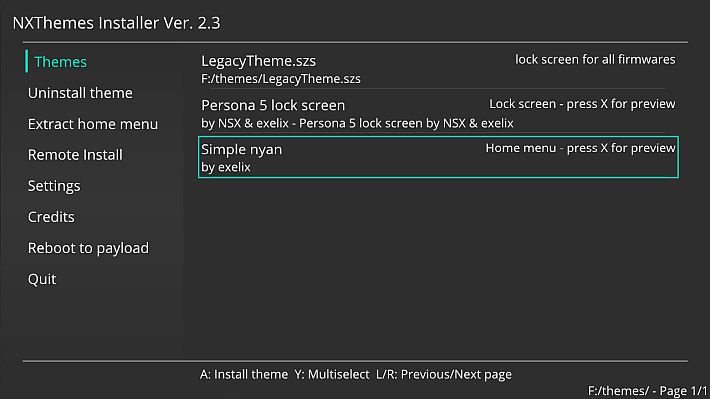
The new release integrates support for the new Themezer API , thus solving the issue reported in issue #152 .
This update provides better compatibility with online services related to theme distribution and ensures more stable and reliable operation of the two applications.
Requirements
- A 720p background image (see the FAQ to find out why).
- Switch Theme Injector Online OR the offline windows application ( alternative download ).
- Only if you are using the web version: A way to convert images to DDS (the Windows version of this app, Photoshop, Paint.net, Gimp, this website).
- NXThemes Installer homebrew application for installing themes on the Switch (also available in the homebrew appstore).
Create a theme
Note: This is the new method used for version 3.4, however you can continue to use the old method if you prefer.
- Open web injector or the application on Windows.
- Move to the “nxtheme builder” tab.
- Select the part of the Home menu you want to use as your theme.
- Click the green OPEN IMAGE button on the web injector or “…” in the Windows app and select the image.
- If desired, select a custom layout.
- Finally click on “Build nxtheme”.
Note: If you are using Web Injector you can only use DDS images, the Windows app also supports JPG and PNG .
Install a theme
- Download the NXthemes homebrew installer (the
.nro) file and copy it into the switch folder on your SD card. - Create a new folder inside the SD card and rename it to
themes, copy the szs or nxtheme files into it. - Run the installer through any Custom Firmware and use it to install the themes.
How to share a theme
Themes are currently available in two distinct versions, you can use SZS files or you can choose to use the new NXTHEME format .
Unlike SZS files, the NXTHEME format no longer contains copyrighted data, meaning they can now be shared over the network. They can also be installed on any firmware, so there are no more compatibility issues!
About custom layouts
To create custom layouts you need a tool to edit bflyt files like Wexos Toolbox, then you can use the Switch theme injector to export your changes as a JSON file (Windows only).
These JSON patches are totally legal and can be shared, read how to create them here , when sharing you can optionally include a preview jpg file with the same name as the json file.
To use a JSON patch downloaded from the Internet, copy it to the folder layoutand restart the Switch, it will appear in the patch list when you open a compatible SZS file.
For Auto-Theme, upload the JSON file to a compatible host and create a link on the Auto-Theme page .
Command line arguments
If desired, you can automate theme creation using command line arguments. Here’s an example of how to create a theme:
Type the following into a command prompt:
SwitchThemes.exe buildNX home "<il file image.png/jpg/dds>" "<file di layout json, facoltativo>" "name=<nome tema>" "author=<nome autore>" "out=<OutputPath>.nxtheme"
This command will build a theme for the menu home, while if you prefer to change the menu, you can use: lockfor lockscreen, appsfor all apps screen, setfor settings applet, userfor user page applet and newsfor news applet.
FAQ
Question: Why are nxtheme files better than SZS files?
Answer: They are legal, meaning they can be shared freely, and they are firmware-independent so they can be installed on any firmware. It is also a more flexible format that can be extended in the future to support other features, such as theme packages.
Question: Why can only 720p images be used, I want to use a 1080p or 4K one!?
Answer: There are two reasons: First, the internal resolution of the main menu is only 720p, regardless of whether docked or not, which means the image will automatically be scaled to 720p. Second, larger images seem more likely to crash the console during startup.
Question: Do custom layouts work on 5.X?
Answer: Yes, but you need to ResidentMenu.szsuse common.szs.
Question: I had a custom theme, updated my console, and now it crashes on startup.
Answer: This is because you now have a theme for a different firmware. Delete the theme on your SD card and download one for your new firmware.
Question: My Switch freezes on startup.
Answer: This should have been fixed with the new version 2.0 of Switch Theme Injector. You may be using a theme created with the previous version. If you encounter this issue with themes created with the latest version, please let us know.
Question: Why does the news applet crash?
Answer: You’re using the old patch .bflyt(see the spoiler at the top of the thread). Use this tool to fix your themes.
Question: Do themes work on firmwares older than 5.1.0?
Answer: This tool should work on older firmwares, but we haven’t tested it. If you want to try, you’ll need to use a file common.szsfrom the firmware you want to modify and follow this guide. If your theme works, let us know!
Please note that if you encounter issues with older firmware, we may not be able to help you.
Edit: Version 4.0.1 works but has some issues (tested by hax4dayz).
Question: Does Switch theme injector work on Linux?
Answer: Yes, it’s a simple winform application and runs through Wine, but the user interface won’t be as nice.
Question: Can a custom theme modify my Switch?
Answer: No, custom themes are applied via layer files, no changes are made to the NAND.
Changelog
- This release implements the new Themezer API, fixing issue #152 .
Many of the compatibility features with firmware 20.0 remain; more details are available in the post for the previous version .
Download: SwitchThemeInjector v4.8.2
Download: NxThemes Installer v2.8.2
Download: Source code SwitchThemeInjector v4.8.2
Source: github.com
Dịch Vụ Chép Game Tại TP.HCM – Hỗ Trợ Tất Cả Quận
Chép Game Ổ Cứng Ngoài Giá Rẻ – Hỗ Trợ PS, Xbox, Nintendo, PC
Dịch Vụ Chép Game PSP Giá Rẻ – Game Việt Hóa Cập Nhật Mới Nhất
Dịch Vụ Chép Game PSVITA Giá Rẻ – Game Việt Hóa Cập Nhật Mới Nhất
Dịch Vụ Chép Game PS2 Giá Rẻ – Game Việt Hóa Cập Nhật Mới Nhất
Dịch Vụ Chép Game NINTENDO SWITCH Giá Rẻ – Game Việt Hóa Cập Nhật Mới Nhất
Dịch Vụ Chép Game PS5 Giá Rẻ – Game Việt Hóa Cập Nhật Mới Nhất
Dịch Vụ Chép Game XBOX 360 Giá Rẻ – Game Việt Hóa Cập Nhật Mới Nhất
Dịch Vụ Chép Game PS3 Giá Rẻ – Game Việt Hóa Cập Nhật Mới Nhất
Dịch Vụ Chép Game PS4 Giá Rẻ – Game Việt Hóa Cập Nhật Mới Nhất
Dịch Vụ Chép Game PC Giá Rẻ – Game Việt Hóa Cập Nhật Mới Nhất