
A new update has been released for Switch ezRemote Client , the File Manager aims to make it easier to connect the Switch console to remote FTP, SMB, and WebDAV servers for file management.
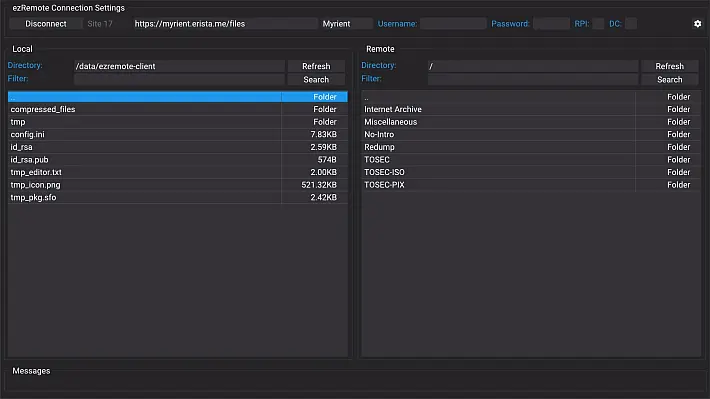
The application interface is clearly inspired by the Filezilla client , offering a GUI with a very similar command. In addition, this application also acts as a file manager.
This new release updates the on-screen keyboard with a global version, allowing text entry in all languages.
Installation
- Download and copy
ezremote-client.nrointo the/switchSD card folder. - Install the file
ezremote-client.nsp.
Usage
To distinguish between FTP, SMB or WebDAV, the URL address must be preceded by the prefix ftp://, smb://, webdav://or webdavs://.
The URL address format for FTP is:ftp://hostname[:porta]
hostnameIt can be the hostname text or an IP address, this is mandatory.- This
portais optional and defaults to 21 (ftp) if not provided.
The URL address format for SMB is:smb://hostname[:porta]/nome_condivisione
hostnameIt can be the hostname text or an IP address, this is mandatory.- This
portais optional and defaults to 445 if not provided. nome_condivisioneIt is mandatory.
The URL address format for WebDAV is: webdav://hostname[:porta]/[percorso_url]andwebdavs://hostname[:porta]/[percorso_url]
hostnameIt can be the hostname text or an IP address, this is mandatory.- It
portais optional and defaults to 80 (webdav) and 443 (webdavs) if not provided. percorso_urlIt is optional based on WebDAV hosting requirements.
Tested with the following WebDAV servers
- (Recommended) RClone – To host your own WebDAV server, you can use RClone WebDAV server as a proxy for over 70 public file hosting services (e.g. Google Drive, OneDrive, Mega, Dropbox, NextCloud, etc.).
- Dufs – To host your own WebDAV server.
- SFTPgo – For a locally hosted WebDAV server. Can also be used as a WebDAV frontend to Cloud Storage such as AWS S3, Azure Blob, or Google Storage.
Native Application Features
- Transfer files back and forth between the Switch and FTP/SMB/WebDAV server.sd
- File management function includes cut/copy/paste/rename/delete/new folder/file for files on the Switch console’s SD card.
Checks
 – Menu (after selecting one or more files/folders).
- – Select button/text box.
- – Uncheck the file list to switch to other widgets.
- – Mark files/folders for Delete/Rename/Upload/Download.
 – Navigate through the list of remote files.
- – Navigate through the list of local files.
- – Exit the application.
 – Menu (after selecting one or more files/folders).
 – Select button/text box.
 – Uncheck the file list to switch to other widgets.
 – Mark files/folders for Delete/Rename/Upload/Download.
 – Navigate through the list of remote files.
 – Navigate through the list of local files.
 – Exit the application.
Multilingual support
The application supports the following languages which are automatically detected by the program.
- Dutch
- English
- French
- German
- Italian
- Japanese
- Korean
- Polish
- Portuguese_BR
- Russian
- Spanish
- Simplified Chinese
- Traditional Chinese
The following are not standard languages supported by the console, so they require a configuration file update.
- Arabic
- Catalan
- Croatian
- Basque
- Galician
- Greek
- Hungarian
- Indonesian
- Romanian
- Ryukyu
- Thai
- Turkish
User needs to edit the file /switch/ezremote-client/config.iniand update the language setting with the exact values from the list above.
HELP: There are no language translations for the following languages, so they are not supported yet. Help us expand the list by submitting translations for the following languages. If you would like to help, download this template , make changes, and submit an issue .
- Finnish
- Swedish
- Danish
- Norwegian
- Czech
- Vietnamese
Changelog
- Updated the on-screen keyboard to global, allowing text entry in all languages.
Download: Switch ezRemote Client v1.13 (NRO) ( NSP )
Download: Source code Switch ezRemote Client v1.13
Source: github.com