
A quick update for NX Activity Log has been released , the application allows us to check the log of activities carried out on the Nintendo Switch console .
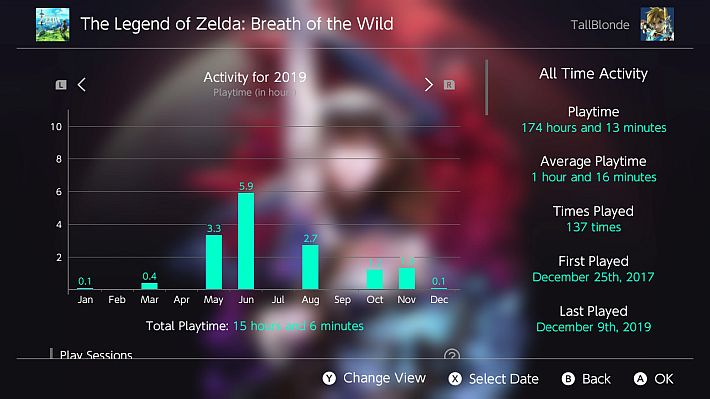
This new version fixes two significant issues: the first concerns the lack of display of game data in the “All” and “Recently” modes, which have now been restored correctly.
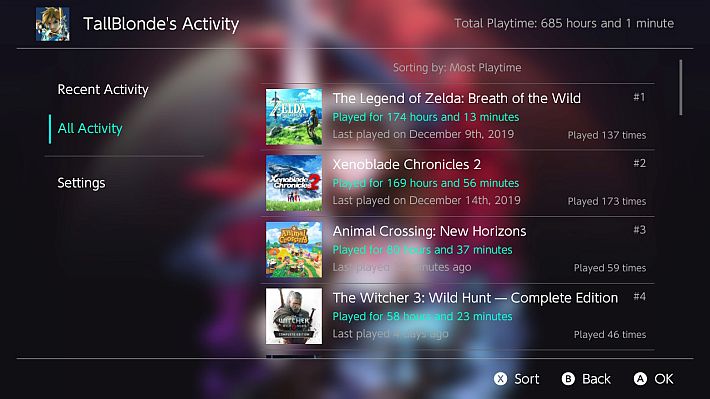
The second issue concerns an error in the debug log writing interface, which has been fixed to ensure more stable and consistent behavior when recording system information.
Characteristics
This application currently has the following features:
- View playback activity (per user).
- All active times:
- Total playing time in minutes.
- Number of times a game has been launched.
- Date of first launch.
- Date/time of most recent launch.
- Average time spent in a game.
- Sort games by time played, recently played, etc.
- Recent Activity (see note below).
- Graph displaying playing time.
- View by day, month or year.
- Total playing time in seconds.
- Number of throws.
- Viewing each ‘Play Session’.
- Event-by-event breakdown of your business.
- All active times:
- Multilingual support.
- English, Chinese (Simplified and Traditional), French, German, Italian, Korean, Portuguese, Russian, Spanish and Turkish.
- Theme Support
- Automatic theme detection to match the Switch’s color scheme
- Theme support.
- All colors used in the app can be adjusted.
- Set a custom background image:
- Requires a PNG file saved in
/config/NX-Activity-Log/background.png.
- Requires a PNG file saved in
- In-app update.
- Automatically check for updates and display an icon if available.
- Update completely within the app.
- User Page Replacement:
- Requires LayeredFS and Atmosphere 0.10.0+, ReiNX or SXOS (or create and copy the forwarder into the CFW-specific titles folder).
- Requires the file
.nroto be in the directory/switch/NX-Activity-Log/NX-Activity-Log.nro.
Note: The data shown in Recent Activity may be slightly inaccurate over longer periods of time (such as a power off for a few minutes). If activity is not shown for earlier periods of time, it’s likely that your Switch console was reset at some point, which erases the data used to calculate play time this way.
Reporting incorrect data
If you see extremely incorrect values or you think the play time shown is incorrect in the Recent Activity or Details screen, do the following:
- Download and run the file
.nrofrom this address . - Let it run; if it seems to be stuck, leave it for a minute!
- Once finished, you should find a new file named
playlog.txtinside your SD card. - Create a problem with the following:
- Screenshot of incorrect data (make sure the playback date and time are visible).
- The file
playlog.txtacquired from the last steps.
Note: If the data shown in All Activity is incorrect, I can’t do anything! These values are read directly from the Switch console and are not the result of calculations.
Known issues
- The main issue at the moment is that some users’ playtime is incorrect. This is due to the Switch being reset at some point and/or some games not requiring a user to be selected to play. I’m looking into how to fix the first one!
- Having many games registered can cause excessive memory usage when launched via User Page/Album, resulting in memory crashes and/or missing images/text.
- I think I know a way to fix this, but if it affects you, you will have to start this app in title mode for now.
- Having many games recorded causes a long pause/hang while loading the “All Activity” screen.
- Once I learn to manage threads this won’t be a problem.

- Once I learn to manage threads this won’t be a problem.
- Changing the date while a game is minimized causes incorrect play/game sessions to be displayed.
- Nothing I can do because the weather has literally been changed!

Changelog
- Fixed game data not loading in the “All” and “Recently” views.
- Fixed bug in debug log writing interface.
Download: NX Activity Log v1.5.5
Download: Source code NX Activity Log v1.5.5
Source: gbatemp.net
Dịch Vụ Chép Game Tại TP.HCM – Hỗ Trợ Tất Cả Quận
Chép Game Ổ Cứng Ngoài Giá Rẻ – Hỗ Trợ PS, Xbox, Nintendo, PC
Dịch Vụ Chép Game PSP Giá Rẻ – Game Việt Hóa Cập Nhật Mới Nhất
Dịch Vụ Chép Game PSVITA Giá Rẻ – Game Việt Hóa Cập Nhật Mới Nhất
Dịch Vụ Chép Game PS2 Giá Rẻ – Game Việt Hóa Cập Nhật Mới Nhất
Dịch Vụ Chép Game NINTENDO SWITCH Giá Rẻ – Game Việt Hóa Cập Nhật Mới Nhất
Dịch Vụ Chép Game PS5 Giá Rẻ – Game Việt Hóa Cập Nhật Mới Nhất
Dịch Vụ Chép Game XBOX 360 Giá Rẻ – Game Việt Hóa Cập Nhật Mới Nhất
Dịch Vụ Chép Game PS3 Giá Rẻ – Game Việt Hóa Cập Nhật Mới Nhất
Dịch Vụ Chép Game PS4 Giá Rẻ – Game Việt Hóa Cập Nhật Mới Nhất
Dịch Vụ Chép Game PC Giá Rẻ – Game Việt Hóa Cập Nhật Mới Nhất