
A new update has been released for PS5 ezRemote Client , the tool developed by developer cy33hc allows us to connect the PlayStation 5 console to remote servers via FTP/SFTP, SMB (Windows Share), NFS, WebDAV and HTTP for file transfer.
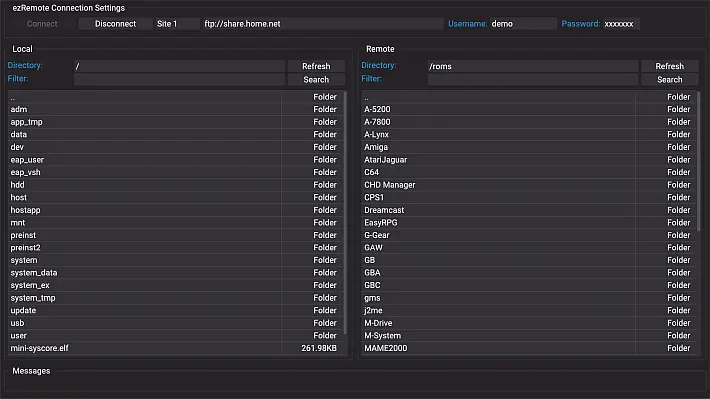
The application interface is clearly inspired by the Filezilla client , offering a GUI with a very similar command. In addition, this application also acts as a file manager.
In this new version, a problem that arose after an update of the libcurl library, which prevented the connection to the archive.org site, has been fixed.
To fix it, I had to recompile wolfSSL with the option WOLFSSL_NO_ASN_STRICTand then rebuild libcurl.
Additionally, the socket send and receive buffer for the httplib-cpp library has been increased, resulting in a noticeable improvement in transfer speed from WebDAV and HTTP servers.
Application Features
- Transfer files between PS5 and FTP/SMB/NFS/WebDAV server.
- Support for connecting to HTTP servers (Apache/Nginx, Microsoft IIS, Serve) with HTML document listing for package download or installation
.pkg. - Connection to Archive.org and Myrient sites .
- Creating ZIP files on your PS5’s local disk or USB drive.
- Extract ZIP, 7ZIP and RAR files .
- File management functions: cut, copy, paste, rename, delete, create folders/files on PS5, USB or WebDAV Server.
- Plain text editor for editing configuration files.
- Limitations:
- Supports files up to 32KB .
- Edit lines up to 1023 characters (longer lines will be truncated).
- For files with common extensions (
txt, log, ini, json, xml, html, conf, config), selecting with the key automatically opens the editor.
- Limitations:
 automatically opens the editor.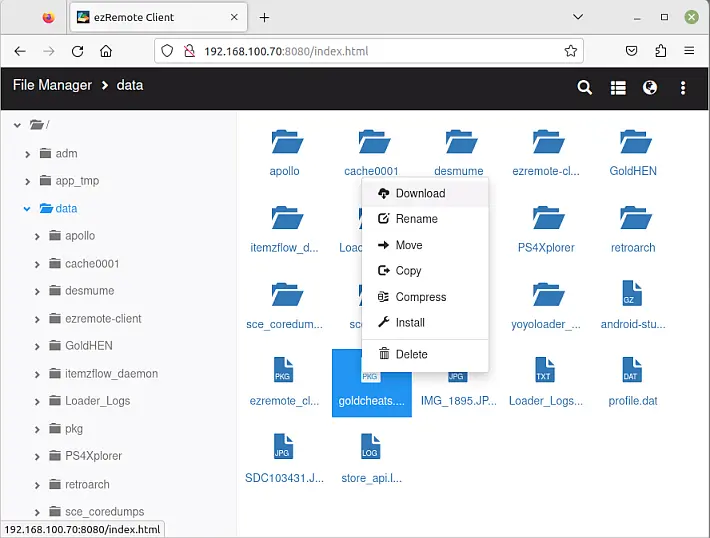
Web Interface Features
- File Management: Copy, Move, Delete, Rename, Create Files/Folders.
- Direct extraction of 7ZIP, RAR and ZIP files on PS5.
- Compress files into ZIP directly on the PS5.
- Edit text files directly on your PS5.
- Viewing common image formats.
- Uploading and downloading files from your PS5.
How to access the Web Interface
- Launch the “ezRemote Client” app on your PS5.
- On any device (PC, tablet, smartphone) open a browser and type:
http://<indirizzo_IP_PS5>:9090 - The port number can be changed in the Global Settings app on the PS5.
Installation
- Extract the contents of the file
ezremote_client.zipto the folder/data/homebrewon your PS5. - Load Payload
websrv: Without it, the ezRemote Client app cannot start. - Load kstuff or etaHen ( kstuff recommended for faster package installation).
- Install
PS5-ezRemoteClient.pkgto create a shortcut in the console dashboard, so you can launch the app directly viawebsrv.
Usage
To distinguish between FTP, SMB, NFS, WebDAV or HTTP, the URL must be preceded by the following prefixes:
ftp://, ,sftp://,smb://,nfs://,webdav://,webdavs://,http://https://
URL Format for FTP
FTP: ftp://hostname[:port]
SFTP: sftp://hostname[:port]
hostname: This can be a domain name or an IP address (required).port: Optional, default 21 (FTP) and 22 (SFTP).
For Secure FTP (SFTP), you can use identity files. Enter id_rsaand id_rsa.pubin a folder on the PS5 disk. In the password field, instead of entering a password, enter the path to the folder, preceded by file://.
- Example: If the files are located in
/data/ezremote-client, in the password field enterfile:///data/ezremote-client.
URL Format for SMB (Windows Share)
smb://hostname[:port]/sharename
hostname: Domain name or IP address (required).port: Optional, default 445.sharename: Share name (required).
URL Format for NFS
nfs://hostname[:port]/export_path[?uid=<UID>&gid=<GID>]
hostname: Domain name or IP address (required).port: Optional, default 2049.export_path: Export path (required).uid: UID to communicate with the server (default 65534).gid: GID to communicate with the server (default 65534).
Note: Special characters in the path must be encoded in %xx.
- Example:
- Original URL:
nfs://192.168.0.1/my?path?uid=1000&gid=1000 - Correct URL:
nfs://192.168.0.1/my%3Fpath?uid=1000&gid=1000
- Original URL:
URL Format for WebDAV
webdav://hostname[:port]/[url_path]webdavs://hostname[:port]/[url_path]
hostname: Domain name or IP address (required).port: Optional, default 80 (WebDAV) and 443 (WebDAVS).url_path: Optional, depends on WebDAV host.
URL Format for HTTP Server
hostname: Domain name or IP address (required).port: Optional, default 80 (HTTP) and 443 (HTTPS).url_path: Optional, depends on your server configuration.
Download from online archives
- Only supports parsing download URLs, such as Internet Archive (file list).
- For Myrient , enter
https://myrient.erista.me/filesin the server field.
Tested WebDAV Servers
- Dufs (recommended, supports anonymous access required for Remote Package Install).
- SFTPgo (can act as a WebDAV frontend to cloud storage like AWS S3, Azure Blob, Google Storage).
- box.com (note: folder deletion not supported due to service limitations).
- mega.nz (via megacmd ).
- 4shared.com
- drivehq.com
Remote Package Installer Function
Soon.
Checks
- – Menu (after selecting one or more files/folders).
- – Select button/text box.
- – Deselect the file list to switch to other widgets or close dialogs.
- – Mark files/folders for Delete/Rename/Upload/Download.
 – Navigate through the list of local files.
 – Return to the parent folder.
 – Exit the application.
 – Menu (after selecting one or more files/folders).
 – Deselect the file list to switch to other widgets or close dialogs.
 – Mark files/folders for Delete/Rename/Upload/Download.
 – Navigate through the list of local files.
 – Return to the parent folder.
 – Exit the application.
Multilingual support
The application supports the following languages which are automatically detected by the program.
- Dutch
- English
- French
- German
- Italian
- Japanese
- Korean
- Polish
- Portuguese_BR
- Russian
- Spanish
- Simplified Chinese
- Traditional Chinese
- Arabic
- Catalan
- Croatian
- Basque
- Galician
- Greek
- Hungarian
- Indonesian
- Romanian
- Ryukyu
- Thai
- Turkish
- Ukrainian
- Vietnamese
There are about 31 translations missing for all languages. Anyone who wants to contribute can download the Template , make changes and submit the file via issue .
Languages not yet supported (translations required)
- Finnish
- Swedish
- Danish
- Norwegian
- Czech
- …and any other available language!
Changelog
- Updating the libcurl library broke the connection to archive.org, so I had to recompile wolfssl with the option
WOLFSSL_NO_ASN_STRICTand recompile libcurl as well . - Increased socket send/receive buffer for httplib-ccp , which appears to improve transfer speed from WebDAV and HTTP servers .
Download: PS5 ezRemote Client v1.08 (zip)
Download: PS5 ezRemote Client v1.08 (pkg)
Download: Source code PS5 ezRemote Client v1.08
Source: github.com
Dịch Vụ Chép Game Tại TP.HCM – Hỗ Trợ Tất Cả Quận
Chép Game Ổ Cứng Ngoài Giá Rẻ – Hỗ Trợ PS, Xbox, Nintendo, PC
Dịch Vụ Chép Game PSP Giá Rẻ – Game Việt Hóa Cập Nhật Mới Nhất
Dịch Vụ Chép Game PSVITA Giá Rẻ – Game Việt Hóa Cập Nhật Mới Nhất
Dịch Vụ Chép Game PS2 Giá Rẻ – Game Việt Hóa Cập Nhật Mới Nhất
Dịch Vụ Chép Game NINTENDO SWITCH Giá Rẻ – Game Việt Hóa Cập Nhật Mới Nhất
Dịch Vụ Chép Game PS5 Giá Rẻ – Game Việt Hóa Cập Nhật Mới Nhất
Dịch Vụ Chép Game XBOX 360 Giá Rẻ – Game Việt Hóa Cập Nhật Mới Nhất
Dịch Vụ Chép Game PS3 Giá Rẻ – Game Việt Hóa Cập Nhật Mới Nhất
Dịch Vụ Chép Game PS4 Giá Rẻ – Game Việt Hóa Cập Nhật Mới Nhất
Dịch Vụ Chép Game PC Giá Rẻ – Game Việt Hóa Cập Nhật Mới Nhất