
We have reached six updates for version 1.47.48f of webMAN Mod , the plugin developed by developer Aldo Vargas , which allows us to manage games, contents and system settings directly from the PlayStation 3 console interface .
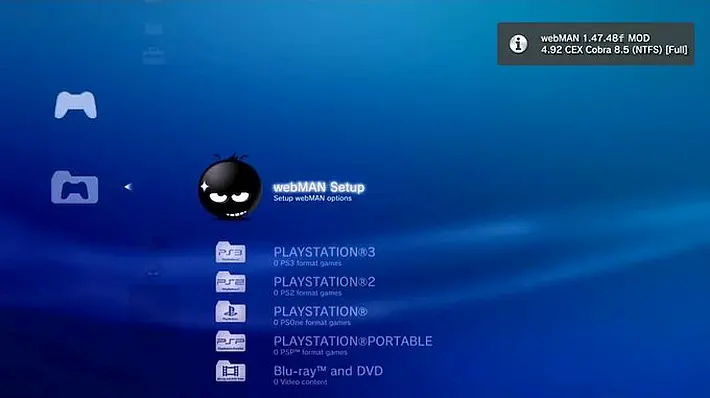
With the latest updates, the webMAN Mod plugin has introduced important novelties in the field of GPU overclocking.
https://platform.twitter.com/embed/Tweet.html?creatorScreenName=Checcolin80&dnt=true&embedId=twitter-widget-0&features=eyJ0ZndfdGltZWxpbmVfbGlzdCI6eyJidWNrZXQiOltdLCJ2ZXJzaW9uIjpudWxsfSwidGZ3X2ZvbGxvd2VyX2NvdW50X3N1bnNldCI6eyJidWNrZXQiOnRydWUsInZlcnNpb24iOm51bGx9LCJ0ZndfdHdlZXRfZWRpdF9iYWNrZW5kIjp7ImJ1Y2tldCI6Im9uIiwidmVyc2lvbiI6bnVsbH0sInRmd19yZWZzcmNfc2Vzc2lvbiI6eyJidWNrZXQiOiJvbiIsInZlcnNpb24iOm51bGx9LCJ0ZndfZm9zbnJfc29mdF9pbnRlcnZlbnRpb25zX2VuYWJsZWQiOnsiYnVja2V0Ijoib24iLCJ2ZXJzaW9uIjpudWxsfSwidGZ3X21peGVkX21lZGlhXzE1ODk3Ijp7ImJ1Y2tldCI6InRyZWF0bWVudCIsInZlcnNpb24iOm51bGx9LCJ0ZndfZXhwZXJpbWVudHNfY29va2llX2V4cGlyYXRpb24iOnsiYnVja2V0IjoxMjA5NjAwLCJ2ZXJzaW9uIjpudWxsfSwidGZ3X3Nob3dfYmlyZHdhdGNoX3Bpdm90c19lbmFibGVkIjp7ImJ1Y2tldCI6Im9uIiwidmVyc2lvbiI6bnVsbH0sInRmd19kdXBsaWNhdGVfc2NyaWJlc190b19zZXR0aW5ncyI6eyJidWNrZXQiOiJvbiIsInZlcnNpb24iOm51bGx9LCJ0ZndfdXNlX3Byb2ZpbGVfaW1hZ2Vfc2hhcGVfZW5hYmxlZCI6eyJidWNrZXQiOiJvbiIsInZlcnNpb24iOm51bGx9LCJ0ZndfdmlkZW9faGxzX2R5bmFtaWNfbWFuaWZlc3RzXzE1MDgyIjp7ImJ1Y2tldCI6InRydWVfYml0cmF0ZSIsInZlcnNpb24iOm51bGx9LCJ0ZndfbGVnYWN5X3RpbWVsaW5lX3N1bnNldCI6eyJidWNrZXQiOnRydWUsInZlcnNpb24iOm51bGx9LCJ0ZndfdHdlZXRfZWRpdF9mcm9udGVuZCI6eyJidWNrZXQiOiJvbiIsInZlcnNpb24iOm51bGx9fQ%3D%3D&frame=false&hideCard=false&hideThread=false&id=1913724115573162089&lang=it&origin=https%3A%2F%2Fwww.biteyourconsole.net%2F2025%2F04%2F20%2Fscena-ps3-rilasciato-webman-mod-v1-47-48f-update-6%2F&sessionId=6e9578e0a5723bab4b374156e671c12ed840a67c&siteScreenName=BiteYourConsole&theme=light&widgetsVersion=2615f7e52b7e0%3A1702314776716&width=550px
In particular, a new method has been implemented to apply overclocking to the GPU’s video memory, which now occurs progressively: the increases or decreases occur in 25 MHz steps, with a pause of 200 milliseconds between each change, making the operation more stable.
On the technical front, the overclocking syscall has been changed from syscall 11 to syscall 8, while new hotkeys have been added to adjust the GPU frequency directly via the controller.
By pressing  +
+  with the arrow keys, you can change the GPU core or VRAM frequency by 50 MHz or 25 MHz per step respectively.
Additionally, a fail safe system has been introduced to ignore overclocking at boot by holding down or  , while the overclocking functions have been completely restructured for greater efficiency.
Minor improvements have also been made, such as using a four-digit year format in screenshots, fixing some web calls via GET, and updating the handling of default icon paths.
Functionally, the code responsible for displaying RSX frequency has been separated, and support for custom overclocking on a per-game basis via labels of the type [RSX<Mhz>-<Mhz>].
Finally, when you unmount a game, your GPU settings automatically revert to their default values.
Current Features
General
- Support for all kinds of Custom Firmware with Cobra function enabled (version 4.46-4.90 CEX, DEX and DECR).
- Support for all Evilnat Custom Firmware (version 4.75.2-4.91 CFW/HFW/CEX/DEX/PEX/D-PEX/DECR).
- Support for REBUG firmware with Cobra feature disabled (version 4.84.2-4.86.1 CEX, DEX and DECR).
- Support for REBUG firmware with Mamba loaded via
boot_plugins_nocobra_kernel.txt(version 4.86.1 CEX and 4.84.2 DEX). - Support for PS3HEN on OFW firmware 4.82-4.84 CEX and DEX and HFW 4.84-4.90.
- Classic Custom Firmware support with Mamba loaded via IRISMAN (version 3.41-4.90 CEX, DEX and DECR)-
- Classic Custom Firmware support with Mamba/PRXLoader (version 3.41-4.90 CEX, DEX and DECR).
- Classic Custom Firmware support with PRXLoader (version 3.41-4.90 CEX, DEX and DECR).
All PS3 models (including all Fat, Slim 20xx, 21xx, 25xx, 3xxx, and SuperSlim 4xxx models) are supported via the PS3HEN payload.
All PS3 models capable of reverting to 3.56 or lower are supported via PS3Xploit Flash Writer (aka PS3Xploit 2.0). See http://www.psdevwiki.com/ps3/SKU_Models for CFW compatibility.
IMPORTANT: To support firmware 4.70 and below, you need to recompile your project LAST_FIRMWARE_ONLYwithoutflags.h .
webMAN vanilla/sMAN features
- FTP server with remote control functions (shutdown/restart).
- WWW server with remote control functions (shutdown/reboot/mount/cpursx/insert/eject/settings).
- Support loading and browsing PS3 [local] games in ISO and folder format, DVD videos in ISO format, Blu-ray movies in ISO format, PS1/PS2/PSP games in ISO format with cover art display.
- NETISO support for loading and browsing PS3 games in ISO and folder format, DVD videos in ISO format, Blu-ray movies in ISO format and PS1 games in ISO format via network.
- NTFS support PS3 and PS1 games ISO format, Blu-ray movies ISO format, and DVD videos ISO format.
- Manual and dynamic fan control and in-game temperature monitoring.
- PAD shortcuts (*open include/combos.h for a complete list of shortcuts).
- Keep External USB Devices Alive and USB Bus Recovery.
- Mounting the latest game or AUTOBOOT.ISO at system startup.
- Support for direct access to NTFS devices via web and FTP (1.45 / 1.45.11).
- XMB integration XMB proxy (1.46 / 1.46.00).
- Integrated PrepNTFS (1.47).
additional and extended features
Installer and GUI
- Easy installation/upgrade with 4 editions: full, lite, standard (rebug) and non-Cobra.
- Integrated online updater from XMB menu.
- New icons created by Berion & Brunolee.
- VSH menu integration (hold
 to view menu).
 - sLaunch GUI integration (hold down
 or
or  + on the XMB to show the game menu GUI).
 - Coverflow web-GUI (
/games.ps3) provides a mobile/desktop graphical interface for quick game selection. - Web-GUI Grid (
/index.ps3) displays games with resizable icons and content can be filtered by type/device/name. - web-GUI for temperature monitoring:
/cpursx.ps3,/cpursx.html&/tempc.htmlo/tempf.html(gauges). - 2 GUI themes: sMAN-like GUI and original webMAN theme.
- LaunchPad integration (DeViL303 mod to use the What’s New section to mount games).
- PhotoGUI integration (DeViL303 mod to use photo albums to mount games).
- XMBM+ integration when XMB content grouping is disabled (v1.33.03).
- Custom XML menu support (
wm_custom.xml) integrated into webMAN’s Games menu. - Install packages from any folder using the web command:
/install.ps3.
 or
or Localization and regional settings
- Translated into 23 languages.
- Support BD/DVD region switching.
- List of games using the localized title in
PARAM.SFO.
Content organization and information display
- The Title ID. can be displayed in the XMB menu (next to the title or as “info” text)
- Covers are displayed using the Title ID which can be found in the ISO file name or folder name (JB game).
- Option to display original file name or title name from
PARAM.SFO. - Option to view covers as disks,
ICON0.PNGor covers from multiMAN, IRISMAN, ManaGunZ repositories or in the same folder as the ISO. - Option for online viewing of covers (free service provided by DeViL303).
- Optional Video subfolder in the “Bluray™ & DVD” folder (displays RetroXMB video, video on USB devices, and data disc icon).
- Extended system information via
/cpursx.ps3(Title ID, Game Icon, APP Version, IDPS/PSID, CFW Version, Last Game Played, Console Running Time and Boot Number). - Display game time and boot time on + and
/cpursx.ps3(use+ + to display game ID, title, game time and other game information). - Use the “home” path to define the default path for
/app_home/PS3_GAMEstartup and+ (e.g. make “★ app_home/PS3_GAME” start multiMAN, IRISMAN, Rebug Toolbox, etc.). - Sets a “home” application to app_home/PS3_GAME when a game is unmounted or via a combination using the web command
/app_home.ps3. - Support for listing and launching NPDRM games stored in
/dev_hdd0/gameor folderGAMEIon FAT32 and NET USB hosts, in addition to andISOfoldersJB. - Support for excluding games by filename and Title ID using
wm_ignore.txt. - View notifications with custom icons and sounds.
Extended game support
- Auto launch game when mounted from XMB by holding down the button
 .
. - Auto focus on category column and disc icon based on content type.
- Support for PSX gamesMulti-CD ISO stored as ISO in HDD0/USB FAT32. Eject/insert USB0 device to mount next CD.
- Can mount PSP games stored on exFAT/NTFS/ext2/3/4/NET devices without copying the file to internal HDD (1.47.27) – Requires prepISO 1.27 or later.
- It can mount PS2 Classics games on PS2 Classic Launcher (
.BIN.ENC). - It can mount PSX games with CD sector sizes: 2352, 2048, 2336, 2448, 2328, 2340, 2368.
- Automatic creation of CONFIG for PS2ISO and PS2 Classic using the configuration database from ManaGunZ or the CONFIG database created by the installer.
- Automatic patching of blacklisted PS2 demos (SCED *** & SLED ***).
- Scan and launch extracted package files in the folder
GAMEIon FAT32 and NET USB hosts. Folder name can betitle_idorcontent_id. - Support for launching SELF applications via PKG/ROM Launcher or via XMB icon: ★ app_home/PS3_GAME.
- Integrated external GameDATA allows installation of game packages and data to external USB drives.
- Built-in prepNTFS allows you to scan PS3ISO, PSXISO, BDISO and DVDISO on NTFS devices without the need to run prepISO/prepNTFS.
- Support for
.ntfs[BDFILE](fake ISO created by IRISMAN or prepISO/prepNTFS): Used to play AVI/MP4 movies or install large packages stored on NTFS. - Support for mounting exFAT/NTFS games using
raw_iso.sprx(Estwald’s rawseciso) – Supports fake ISOs. - Option to mount ISO also in app_home/PS3_GAME icon.
- Supports
last_game.txt/autoboot on non-Cobra edition. - Automatically install mounted PKG from exFAT/ext/NTFS (reduce steps needed to install a PKG file).
- Experimental support for mounting compressed ISOs in zip and 7-zip archives.
- Gameboot as a system emulator. Requires Multi Gameboot MOD by DeViL303. Supports 20 Gameboot animations.
 .
.Emulation features
- ROM support via PKG/ROM Launcher and RetroArch (supports internal storage on HDD/USB/NET with custom icons and background images).
- Enable emulator selection for PS1 and PS2 on consoles B/C ( = ps_emu, = ps_netemu,
 = enable/disable emulator during mounting process).
 - PS2 Launcher/PSP Launcher can be integrated into webMAN’s Games menu for easy access.
- Automatically install/automatically select PSP emulator for PSP games using
MINIS.EDAT/MINIS2.EDATdecrypted.
 = enable/disable emulator during mounting process).
File management and navigation
- Improvements in File Manager (file and folder icons, shortcuts for faster navigation, mounting ISO, mounting net0/ or net1/, preview images, file truncation, copy/paste/delete files and folders).
- Copy operations use shadow copy to hdd0 for faster copy operations.
- It can rip a game from disc to hdd0 or copy from hdd0 to usb000 or from usb00x to hdd0.
- Shortest URL to access paths and files. Use the “home” path in
/setup.ps3to search a user-defined folder. - Support for MD5 hash verification of files stored on PS3 (internal HDD and USB FAT32 only).
- Supports editing small text files (up to 1,300 bytes) via the web.
- Folder size statistics and permission changes.
- Hexadecimal file viewer (Internal HDD/FAT32/NTFS/exFAT/ext2/3/4).
- Experimental zip and unzip support (can extract rar, 7z, bz2, tgz, tar). Requires PKGLAUNCH and app_home/PS3_GAME icon.
- Unlock up to 8% more space on your internal HDD using
/unlockhdd.ps3Thanks to 3141card (picard).
Network Features
- Update to the latest version from the XMB.
- PS3 Manager API (PS3MAPI) support compatible with RTM tools.
- The FTP server includes new commands
SITEto allow copy/paste files locally, unmount the game, enable/disable external game data, enable/disable dev_blind, change file attributes. - Extended support for up to 5 remote network servers.
- Automatically configure the remote IP address when accessing
/setup.ps3from a remote client. - Supports browsing remote network servers even if they are disabled for content scanning.
- The NETISO server on PS3 (ISO only) allows you to share local games with other PS3 consoles on a LAN.
- Download files and install PKGs remotely or with pad hotkeys.
/dev_blindand/dev_hdd1are mounted automatically when accessed via FTP or http or from XMB.- Local web chat support (source code only).
Automation
- Support for user-defined combos (pad shortcuts).
- The virtual pad allows you to send button events remotely via http://pad.aldostools.org on your web browser or with the webPAD software (Windows only).
- Various shortcuts to activate Cobra, exchange Rebug files, mount
net0/ornet1/, show IDPS/PSID, etc.. - Automatic remapping on
/dev_hdd0/packagesunmount (+ ) allows you to use Install all packages to pkg files stored on HDD0. - Support for autoplay on boot of any supported ISO, game folder or autoopen URL link. Only vanilla webMAN can mount
AUTOBOOT.ISO. - Support for auto-correcting games that require a higher firmware version (4.20 and above).
- Supports batch script automation at startup (
dev_hdd0/boot_init.txtordev_hdd0/autoexec.bat), when XMB is loaded (/dev_hdd0/onxmb.bat), or playing at any time (/play.ps3/.bat) - Launch mounted games with the command
/play.ps3. Once a game is mounted via html, click the icon that appears to launch the game on your PS3. - Execute XMB functions with the command
/play.ps3. (example:/play.ps3?col=network&seg=seg_premo) <- this will start the remote play server from the XMB. - Multiple web command interfaces via HTTP, FTP, PS3MAPI, file polling (
dev_hdd0/tmp/wm_request). - Option to automatically play music or video at system startup or via a combination that calls
/browser.ps3$musicor/browser.ps3$video. - Combo + + allows you to set XMB media player as your dynamic wallpaper/theme.
- Combo +++ allows you to navigate the XMB while installing packages.
- Support for automatic mapping of
libsound.sprxda/dev_hdd0/tmp. - Support to enable/disable noBD patch required to rest BD drive.
- Support for relinking identical files in
/dev_hdd0/GAMESand/dev_hdd0/gameusing/stat.ps3&id=?fast. - Support for automatic switching of random or specific wallpapers and VSH resources such as wallpapers, themes, impose,
coldboot_*.ac3,lines.qrc,canyon.qrc,earth.qrcon system startup. - Complete set of web commands and customization features. Link in web commands documentation
 ) allows you to use Install all packages to pkg files stored on HDD0.
 +
+  +
+ Stealth features
- Automatically block PSN access while CFW system calls are enabled (thanks to DeViL303 for the modified screen).
- Support for dumping and spoofing IDPS/PSID/act.dat.
- Support for automatic or manual removal of CFW system calls and spoofed consoleID (IDPS/PSID).
- “Offline” mode (blocks some PSN servers/tracking) and auto-restore when CFW system calls are removed. Game updates still work in this mode (v1.33.03).
- Scan games in the stealth folder “/video”.
Safety and security features
- Improved temperature monitoring (maximum and minimum fan speed, auto mode#2, improved algorithm for dynamic fan control).
- Increased Security: ADMIN mode blocks access to critical functions such as
/setup.ps3,/delete.ps3; Password for FTP server access; restrict remote access to specific IPs. dev_bdvd/PS3_UPDATEis redirected to prevent an accidental update if a game disc is inserted into the drive.- Extended Content Profile Grouping (v1.33.07) – common files + individual content (4 profiles).
- Safe upload mode prevents a brick/semi-brick in case of power failure during ftp uploads to
/dev_blind. - System update redirected
/dev_hdd0/ps3-updatelist.txtusing internal proxy (allows you to bypass firmware version check when logging into PSN).
Memory and debugging
- All LV2 peeks/pokes are done via syscalls 8/9 (CFW only) – syscalls 6/7 used by PS3HEN only.
- Web Debugger (peek/poke/search bytes remotely, lv1 and lv2 memory dump).
- PS3MAPI web GUI debugger (process view, memory search/modification, attach/unload plugins to process, system call handling).
- MIN+ memory profile (same as MIN but uses 512K and 2.5x more buffer for PS3 games).
- MAX+ memory profile (same as MAX 1280K for PS3 games, other buffers are reduced, e.g. 2X less buffer for ftp and 4X for DVD etc…).
- Support up to 3MB from 4 available VSH memory containers [MC] (bg, fg, debug, app).
- Searches for text or binary strings and wildcard patterns in LV1, LV2, process memory range or binary files.
- Patch LV1, LV2, process memory or binary files. Can be concatenated with text or string search and binary patterns.
- Unloads entire RAM, LV1, LV2, VSH, RSX, or a range of process memory.
- Support for remote viewing and updating of XRegistry settings.
- Remote system calls.
Screen and video capture
- Capture XMB screen to BMP format.
- Controlling the XMB screen using
/xmb.html(experimental feature). - Enable in-game screen capture on CFW which doesn’t have the feature.
- Mysis video_rec integrated plugin and get klicensee used by NPDRM content.
Integrated Plugins
- wm_proxy plugin: Proxy that redirects XMB menu actions to web commands.
- sLaunch Plugin: GUI for navigating and mounting games from anywhere on the XMB.
- VSH Menu Plugin: GUI to execute commands from anywhere in the XMB.
- RAWSECISO Plugin: Proxy that handles Cobra’s SCSI requests to access ISO images stored on exFAT/NTFS devices.
- NETISO Plugin: Proxy that handles Cobra SCSI requests to access content stored on remote servers (ps3netsrv).
- Video REC Plugin: Standalone plugin that records video from games. When used, webMAN MOD is unloaded to free up memory.
Add-ons
- ps3netsrv : Remote content distribution server for PC and Linux platforms using Cobra’s NETISO protocol for content streaming.
- prepISO : Tool that scans contents stored on exFAT/NTFS/ext2/3/4 devices and prepares settings files needed for RAWSECISO plugin.
- PKG/ROM Launcher : Allows PS3 applications and ROMs to run via RetroArch. Requires the “★app_home/PS3_GAME” debug icon to be present on the XMB.
- PS2CONFIG : Database of PS2 CONFIG files needed to improve compatibility of some PS2 games.
- WM Themes : A set of packages that customize the look and feel of the XMB icons used by webMAN MOD.
- Reload XMB : PS3 application that forces the XMB icons to reload.
- Boot MAMBA : Package that installs the MAMBA payload for use on Rebug 4.84/4.85/4.86/4.87/4.88 with Cobra disabled.
- MOVIAN.ISO : Custom ISO to boot MOVIAN.
- PS2 Classics Launcher : PS3 application needed to launch PS2 Classics games in
.BIN.ENC. - PSP Remasters Launcher : PS3 application needed to launch PSP Remaster games in ISO format.
- PSP Minis Launcher : PS3 application needed to launch PSP Mini games in ISO format.
- RetroArch : Required to launch emulators that run classic games in ROM format.
- MOVIAN : Required to play audio and video in non-native formats like MKV.
- multiMAN : Optional. Use the backup manager to dump ISOs, download covers, do advanced file management, and more.
- webPAD: http://pad.aldostools.org – Online virtual game pad.
Little-known debug flags used by PS3HEN
clear_web_history.onclear_web_auth_cache.onclear_web_cookie.onhotkey_polling.off<= Disable the L2/R2 buttons on the controller.remap_files.off<= used to modify HEN XML files.
Create these empty files /dev_hdd0/hen/togglesonly if you are having problems starting PS3HEN .
Changelog
- Added explicit support for version 4.92.
- New web commands for overclocking:
/gpuclock.ps3?<mhz>|<mhz>and/memclock.ps3?<mhz>. NEW!! - New PS3MAPI server commands for overclocking. NEW!!
- Added Dynamic Overclocking to
/setup.ps3, usable in-game and on the XMB. NEW!! - You can now skip automatic overclocking by holding down or at system startup. Additionally, you can change the GPU speed by using + along with the arrow keys. NEW!!
- Added support for per-game overclocking, using tags like
[RSX<mhz>-<mhz>]in the game file or folder name. NEW!! - GPU Core and VRAM frequency information is now visible via the + combination . NEW!!
- Added GPU Core and VRAM information to
/cpursx.ps3,@info26and@info27. NEW!! - Updated Web App installers in webMAN MOD update menu. NEW!!
- Improved
/fixclock.ps3, now uses real time clock from aldostools.org server . NEW!! - Added “Auto Clock Correction”
/setup.ps3– updates the clock on startup if the date is before 2025. NEW!! - Added script command:
call <nome-script>, allows to upload file from HTTP server. NEW!! /popup.ps3?<url>can now display a message from a file hosted on an HTTP server. NEW!!- Added
/ps3mapi.ps3?<COMANDO PS3MAPI>to get PS3MAPI responses in JSON format via HTTP. #1180 - Added new PS3MAPI commands for FILE, HDD and BD information with output to JSON or via PS3MAPI server.
- Fixed date calculation in
/fixclock.ps3. - Fixed FTP MLST command to comply with RFC #1204 . Fixed passive mode issue in FlashFXP (thanks to @sunnyqeen).
- Fixed a regression when accessing NTFS files via FTP.
- Fixed a regression when accessing the PS3MAPI server. #1207 NEW!!
- Added “ProDG” option to
/setup.ps3. Fixed app_home mapping issue with ProDG Target Manager. #1198 - Cumulative update (including 18+ commits to the toolset since the initial release of version 1.47.47).
• Covers Pack [PS3] • Covers Pack [PSX/PS2] • RetroArch CE • Wiki [Documentation]
Download: webMAN Mod v1.47.48f
Download: PS2Config
Download: PS2 Classics Launcher
Download: PS3NETSRV (20250126)
Download: PSP Minis Launcher
Download: PSP Remasters Launcher
Download: prepISO v1.33 (formerly prepNTFS)
Download: Source code webMAN Mod v1.47.48f
Source: x.com
Dịch Vụ Chép Game Tại TP.HCM – Hỗ Trợ Tất Cả Quận
Chép Game Ổ Cứng Ngoài Giá Rẻ – Hỗ Trợ PS, Xbox, Nintendo, PC
Dịch Vụ Chép Game PSP Giá Rẻ – Game Việt Hóa Cập Nhật Mới Nhất
Dịch Vụ Chép Game PSVITA Giá Rẻ – Game Việt Hóa Cập Nhật Mới Nhất
Dịch Vụ Chép Game PS2 Giá Rẻ – Game Việt Hóa Cập Nhật Mới Nhất
Dịch Vụ Chép Game NINTENDO SWITCH Giá Rẻ – Game Việt Hóa Cập Nhật Mới Nhất
Dịch Vụ Chép Game PS5 Giá Rẻ – Game Việt Hóa Cập Nhật Mới Nhất
Dịch Vụ Chép Game XBOX 360 Giá Rẻ – Game Việt Hóa Cập Nhật Mới Nhất
Dịch Vụ Chép Game PS3 Giá Rẻ – Game Việt Hóa Cập Nhật Mới Nhất
Dịch Vụ Chép Game PS4 Giá Rẻ – Game Việt Hóa Cập Nhật Mới Nhất
Dịch Vụ Chép Game PC Giá Rẻ – Game Việt Hóa Cập Nhật Mới Nhất