
A new update has been released for POP-FE ( POPstation-FEtcher ), the python script available for Linux and Windows PC that allows us to automate the process of recovering boxarts and installing PS1 games (on PSP/VITA/PS2/PS3).
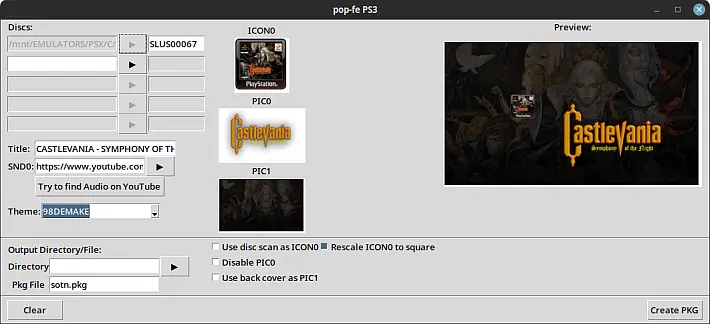
The program needs temporary space in the current directory to process data. There is no need to copy game images to the same directory, as images can be accessed and processed from remote directories.
This new version includes an update with the latest release of pytubefix , fixing issues with downloading audio from YouTube . Additionally, new assets have been added to the program.
For PSP
$ ./pop-fe.py --psp-dir=auto /psx/Grandia1of2.cue /psx/Grandia2of2.cue
To create a PKG for PS3
$ ./pop-fe.py --ps3-pkg=Grandia.pkg /psx/Grandia1of2.ccd /psx/Grandia2of2.ccd
Using POPstation-FEtcher
The program supports various file formats:
.cue: Preferably, extracts the image from the CUE file..ccd: Convert to a temporary CUE file..bin/.img: Convert to a temporary CUE file..zip: Extracts to find a CUE file..chd: Requires the chdman program..*: Various memory images, sorted by size.
Command Line Options
-v: Enable verbose mode for additional information.--title: Specifies the title of the game.--game_id: Force game ID.--cover: Image to use as the game icon.--logo: Image to use as a startup logo on PSP.--pic0: Image to use as PIC0 (Screenshot).--pic1: Image to use as PIC1 (Screenshot).--manual: Specifies a manual in link, zip, or scan directory format.--resolution: Force resolution (NTSC/PAL).--whole-disk: Include all raw audio tracks in PS3 PKG.--watermark: Adds a watermark to PIC0.--list-themes: Lists available themes.--theme <theme>: Use theme images if available.--psio-dir <path>: Specifies the path to the PSIO SD card.--psp-dir <path>: Specify the path for the PSP SD card.--psp-install-memory-card: Install memory images on PSP.--psp-use-cdda: Use full CDDA tracks instead of ATRAC3.--ps2-dir: USB stick directory for POPS on PS2.--ps3-pkg: Create a PS3 PKG.--psc-dir: USB stick directory with AutoBleem.--ps3-libcrypt: Apply libcrypt patches to PS3 packages.--ps1_newemu: Use ps1_newemu for PS3 PKGs.--romhacks: List of hacks to apply.--snd0: Provides an audio file for the XMB.--auto-libcrypt: Attempts to create and apply a libcrypt patch automatically.--retroarch-bin-dir: Directory for Retroarch binaries.--retroarch-cue-dir: Directory for Retroarch CUE files.--retroarch-pbp-dir: Directory for Retroarch PBP images.--retroarch-thumbnail-dir: Directory for the Retroarch cover image.
Examples of use
To convert and install a game on PSP, you can use the command:$ ./pop-fe.py --psp-dir=auto /psx/Metal\ Gear\ Solid\ VR\ Missions.cue
If you have more than one CUE file, they will be treated as a multi-disc game. Example:$ ./pop-fe.py --psp-dir=auto /psx/Grandia1of2.img /psx/Grandia2of2.img
Memory Card Support
POPstation-FEtcher supports various memory image formats. To install a memory image along with the game:$ ./pop-fe.py --psp-dir=auto Crash.cue Crash.srm
Support for PSIO, PS2, PS3, PS Classic, and RetroArch
POPstation-FEtcher also supports converting PSIO, PS2, PS3, PS Classic and RetroArch games, providing specific formats and configurations for each platform.
Requirements and Installation
To install POPstation-FEtcher on Linux, you need some tools and dependencies. Here are the commands for Fedora36 and Debian/Mint:
- Fedora36 :
sudo dnf install python-is-python3 python3-pip python3-devel libsndfile-devel ffmpeg
git clone https://github.com/sahlberg/pop-fe.git
cd pop-fe
./pop-fe.py --install - Debian/Mint :
sudo apt install python-is-python3 python3-pip libsndfile-dev git ffmpeg
git clone https://github.com/sahlberg/pop-fe.git
cd pop-fe
./pop-fe.py --install
Additional Dependencies
Make sure to install the following additional dependencies:
- ecdsa :
pip3 install ecdsa - pycdio/pycdlib : For processing ISO images.
- cue2cu2 : For converting CUE to CU2.
- binmerge : To merge multi-bin files.
- requests : For online data recovery.
Changelog
- New version. Added some new assets, but also a version update of pytubefix to make YouTube audio downloads work again .
Download: POP-FE v1.18
Download: Source code POP-FE v1.18
Source: github.com