
Nintendo has released a major firmware update for the Nintendo Switch , version 20.0.0, ahead of the launch of the new Switch 2 console on June 5.
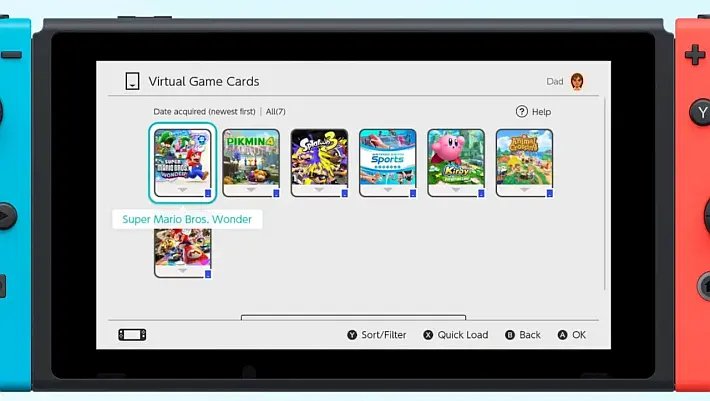
This update introduces several new features, both functional and aesthetic. One of the most notable additions is the new Virtual Game Card system , which allows users to “load” and “eject” digital games between two Switch consoles.
This feature makes it possible to lend digitally purchased games (including DLC and some free software) to members of the same family group associated with the Nintendo Account .
Digital games are now displayed in a dedicated list in the Virtual Game Card menu, making management much more dynamic and flexible.
Another innovative feature is GameShare , which allows the Switch 2 console to wirelessly share a compatible game with other nearby consoles, enabling local shared gaming sessions.
However, this feature is not compatible between older models like the original Switch, OLED Switch, and Switch Lite, but only between Switch 2 devices.
To accompany the transition to the new generation of consoles, Nintendo has introduced the option to completely transfer system settings from the current Switch to the Switch 2.
This transfer can be done via local communication or, in case the user needs to return or give away the old console before receiving the new one, a dedicated server upload function is available.
In the latter case, the console will be initialized to factory data after the upload. Both methods require an internet connection and an active Nintendo Account.
On the aesthetic front, the update has changed the colors of the Nintendo eShop and News icons on the console’s main menu.
Some user icons have been updated in design, improving their visual appearance. Additionally, you can now select and transfer multiple save data at once , making the migration process more efficient.
Finally, new control tools have been added: User verification is now available in the user settings , which allows you to protect access to the Virtual Game Card menu via PIN or Nintendo Account access.
New settings also for online licenses , which allow you to play downloaded software and DLC without having loaded the relative virtual game card, as long as the console is connected to the internet.
This is all part of Nintendo ‘s strategy to prepare the ground for the arrival of the Switch 2 , whose main launch title will be Mario Kart World , also due out on June 5.
The company has already launched a massive advertising campaign, especially in Japan, with TV spots and street billboards.
Changelog
- The following icons related to new features have been added to the HOME menu :
- Virtual Game Card
- Digital software purchased for Nintendo Switch, including DLC and some free software, are now represented by “Virtual Game Cards” and appear in a list within this menu.
- These game cards can be virtually loaded and ejected between up to two Nintendo Switch consoles.
- Virtual Game Cards can be lent to other users in the same family group associated with the Nintendo Account. For more details, see the Virtual Game Card Guide .
- GameShare
- Compatible software can be shared from one Nintendo Switch 2 console to other nearby consoles for playing together.
- Sharing occurs exclusively via local wireless communication, and the Switch 2 console must be the one that initiates the GameShare function.
- This feature cannot be used between two Nintendo Switch consoles, Switch – OLED Model and/or Switch Lite.
- Compatible software can be shared from one Nintendo Switch 2 console to other nearby consoles for playing together.
- Virtual Game Card
- Added User Verification Settings entry in the User > User Settings path .
- You can restrict access to the Virtual Game Card menu by requiring a PIN or signing in to your Nintendo Account .
- Added Settings for Online Licenses item .
- When this option is enabled, you can play downloaded or purchased software or DLC while your console is connected to the Internet, even if you don’t load the virtual game card.
- For more information, see the option details in the System Settings screen .
- The colors of the Nintendo eShop and Nintendo Switch News icons on the HOME Menu have been changed.
- You can now select and transfer multiple save data at once in the Transfer Your Save Data menu .
- Added System Transfer to Nintendo Switch 2 to System Settings > System .
- You can transfer your system from your Nintendo Switch to your Nintendo Switch 2 via local communication.
- For users who will lose access to their Nintendo Switch before receiving the Nintendo Switch 2, there is an option to upload the transfer data to a dedicated server, from where it can then be recovered on the Nintendo Switch 2. After uploading, the console will be restored to factory settings, so only perform this step if you are able to complete the transfer on the new console.
- If you want to continue using your Nintendo Switch until the Nintendo Switch 2 arrives, we recommend that you perform the system transfer via local communication after receiving your new console.
- To complete the system transfer, whether locally or via server, an internet connection and a Nintendo Account are required .
- For more details, see System Transfer from Nintendo Switch to Nintendo Switch 2 .
- You can transfer your system from your Nintendo Switch to your Nintendo Switch 2 via local communication.
- The appearance of some user icons has been updated.
Note: With the introduction of Virtual Game Cards, the term “Primary Console” has been discontinued and replaced with “Pass-Enabled Console.” On a console set as a “Pass-Enabled Console” for a user, all users of that console will be able to access certain subscriptions or Passes for certain software .
For more information, see the guide How to set up or change the Pass-enabled console for a Nintendo Account .
Source: en-americas-support.nintendo.com
Dịch Vụ Chép Game Tại TP.HCM – Hỗ Trợ Tất Cả Quận
Chép Game Ổ Cứng Ngoài Giá Rẻ – Hỗ Trợ PS, Xbox, Nintendo, PC
Dịch Vụ Chép Game PSP Giá Rẻ – Game Việt Hóa Cập Nhật Mới Nhất
Dịch Vụ Chép Game PSVITA Giá Rẻ – Game Việt Hóa Cập Nhật Mới Nhất
Dịch Vụ Chép Game PS2 Giá Rẻ – Game Việt Hóa Cập Nhật Mới Nhất
Dịch Vụ Chép Game NINTENDO SWITCH Giá Rẻ – Game Việt Hóa Cập Nhật Mới Nhất
Dịch Vụ Chép Game PS5 Giá Rẻ – Game Việt Hóa Cập Nhật Mới Nhất
Dịch Vụ Chép Game XBOX 360 Giá Rẻ – Game Việt Hóa Cập Nhật Mới Nhất
Dịch Vụ Chép Game PS3 Giá Rẻ – Game Việt Hóa Cập Nhật Mới Nhất
Dịch Vụ Chép Game PS4 Giá Rẻ – Game Việt Hóa Cập Nhật Mới Nhất
Dịch Vụ Chép Game PC Giá Rẻ – Game Việt Hóa Cập Nhật Mới Nhất