
A new update has been released for Checkpoint , the popular tool for backing up and managing save states on Nintendo 3DS and Nintendo Switch consoles .
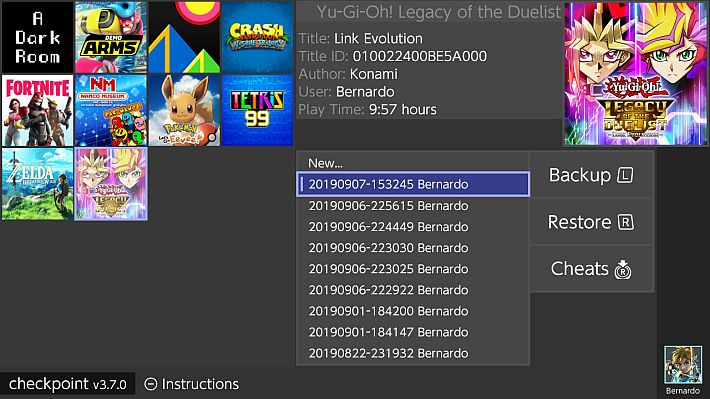
This new version focuses in particular on fixing the well-known crash on startup issue that has plagued the 3DS version since release 3.8.0.
The bug was finally identified and fixed thanks also to the support of the community, in particular a Discord user who actively collaborated in debugging on his console.
If the error still occurs, the team invites you to promptly report it via Discord or GitHub.
Among the improvements made, the cartridge scanning has been completely redone, which now occurs in a separate thread and no longer at every frame of the graphical interface, thus improving performance.
Additionally, an advanced thread management framework and networking support with an integrated HTTP server have been introduced, initially used to consult application logs in real time.
These logs are saved in the folder /3ds/Checkpoint/logs, sorted by date, and are also accessible from a browser via the console’s IP address.
The update also reintroduces some compiler optimizations, switching from O2to O3and including link-time optimization.
We also improved config file management, synchronization between UI threads and title loading, and implemented global try-catch blocks to prevent future crashes due to unhandled exceptions.
Some graphical improvements and documentation updates round out the release. The future focus will be on further cleaning and optimizing the source code, which has started to become less tidy with this rush release.
Work paths
Checkpoint uses the following folders to store generated files. Note that all directories are automatically generated on first launch (or when Checkpoint finds a new title that doesn’t have a directory yet).
3DS
sdmc:/3ds/Checkpoint: root path.sdmc:/3ds/Checkpoint/config.json: custom configuration file.sdmc:/3ds/Checkpoint/saves/<unique id> <game title>: root path for all save backups of a generic game.sdmc:/3ds/Checkpoint/extdata/<unique id> <game title>: root path for all external data backups of a generic game.
Switch
sdmc:/switch/Checkpoint: root path.sdmc:/switch/Checkpoint/saves/<title id> <game title>: root path for all save backups of a generic game.
Guide
You can use Checkpoint on 3DS consoles with homebrew launchers either through a Custom Firmware or through Rosalina. *Hax-based homebrew application launchers are not supported by Checkpoint.
Checkpoint for Switch only works on homebrew launchers, you must reboot your console after restoring a save via Checkpoint.
The first launch will take much longer than usual (1-2 minutes depending on the number of titles installed), due to the creation of the working directories – Checkpoint will be significantly faster at launch from that point on.
Optionally, you can scroll through the list of titles with the  or LR and select a title with
  when the selector is positioned over it. You can now use the or touchscreen to select a destination backup to restore/overwrite.
Important Notice: In the unlikely event that this release causes problems, please contact the team immediately and temporarily install one of the following releases:
Changelog
- Fix: The crash on startup issue that affected all versions starting from 3.8.0 has been identified and resolved.
- Big thanks to achinech on Discord who volunteered to fix this on his console.
- If you still experience crashes on startup, please notify the team immediately on Discord and GitHub issues.
- Fix: Cartridge scanning has been redesigned to be much more efficient.
- Previously, the software would query the cartridge synchronously for each frame of the UI thread. Now the cartridge scan happens on a separate thread, which runs only twice per second.
- Added: A more advanced threading framework ported from PKSM.
- Added: Built-in HTTP server and network support. Currently used to provide real-time online access to application logs, but this code will be useful for future features like auto-update.
- Added: More robust logging, moved from PKSM. Logs are saved in the folder
/3ds/Checkpoint/logsand sorted by date.- Logs are also accessible at runtime via the built-in HTTP server at the following addresses:
http://3ds-ip-address:8000/logs/memoryfor logs of the current Checkpoint execution.http://3ds-ip-address:8000/logs/filefor all logs for the current date.
- Logs are also accessible at runtime via the built-in HTTP server at the following addresses:
- Added: Compiler optimizations are back. These include link-time optimizations and an upgrade from
O2toO3compared to 3.7.4. - Fixed: Improved handling of configuration files transferred from PKSM.
- Fixed: Improved thread synchronization between the UI thread and the title loading thread.
- Fixed: Wrapped the entire program in try-catch blocks to avoid crashes caused by other unhandled exceptions in the future.
- Fixed: Some graphical improvements.
- Fixed: Readme file has been updated with latest screenshots.
- General system stability improvements to improve user experience.
Download: Checkpoint v3.9.0 for Switch Consoles (NRO) ( ELF )
Download: Checkpoint v3.9.0 for 3DS Consoles (CIA) ( 3DSX ) ( ELF )
Download: Source code Checkpoint v3.9.0
Source: github.com
Dịch Vụ Chép Game Tại TP.HCM – Hỗ Trợ Tất Cả Quận
Chép Game Ổ Cứng Ngoài Giá Rẻ – Hỗ Trợ PS, Xbox, Nintendo, PC
Dịch Vụ Chép Game PSP Giá Rẻ – Game Việt Hóa Cập Nhật Mới Nhất
Dịch Vụ Chép Game PSVITA Giá Rẻ – Game Việt Hóa Cập Nhật Mới Nhất
Dịch Vụ Chép Game PS2 Giá Rẻ – Game Việt Hóa Cập Nhật Mới Nhất
Dịch Vụ Chép Game NINTENDO SWITCH Giá Rẻ – Game Việt Hóa Cập Nhật Mới Nhất
Dịch Vụ Chép Game PS5 Giá Rẻ – Game Việt Hóa Cập Nhật Mới Nhất
Dịch Vụ Chép Game XBOX 360 Giá Rẻ – Game Việt Hóa Cập Nhật Mới Nhất
Dịch Vụ Chép Game PS3 Giá Rẻ – Game Việt Hóa Cập Nhật Mới Nhất
Dịch Vụ Chép Game PS4 Giá Rẻ – Game Việt Hóa Cập Nhật Mới Nhất
Dịch Vụ Chép Game PC Giá Rẻ – Game Việt Hóa Cập Nhật Mới Nhất