
A new update has been released for Checkpoint , the popular tool for backing up and managing save states on Nintendo 3DS and Nintendo Switch consoles .
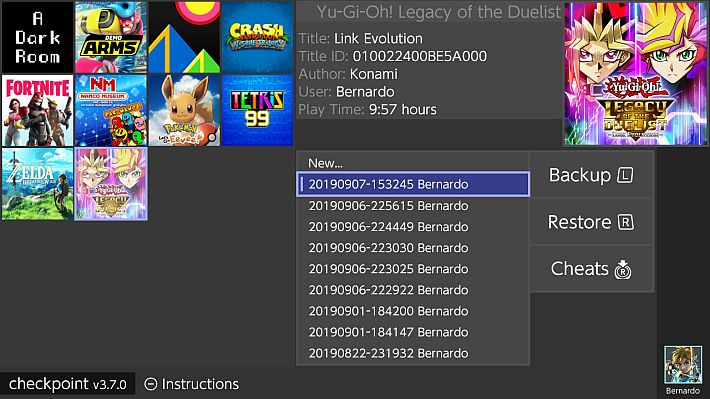
Among the main new features of this release, the code has been updated from C++17 to C++20, improving compatibility and performance. The latest version of the Sharkive cheat repository has also been integrated.
Several improvements have been made to the UI, with rendering simplifications to speed up screen display and a change to the color scheme.
Also fixed a crash that occurred when entering Checkpoint immediately after playing certain titles.
In the Switch version, logs are now broken down by day, preventing the creation of a single large file after years of use.
Old logs can be deleted manually, while new ones will now be stored in the folder /switch/Checkpoint/logs. For the 3DS version, this feature will be added in future updates.
The dependency packages have also been updated, fixing compatibility issues and improving the stability of the software. Another improvement concerns the display of the game time, which is now displayed correctly.
Also fixed a double L/R button assignment issue thanks to the community contribution. Also, the source code has been optimized thanks to the work of independent developers.
Finally, Link Time Optimization (LTO), which was previously used to reduce the size of the executable file, but which caused problems in the 3DS version 3.8.0 without offering significant performance benefits, has been disabled.
Work paths
Checkpoint uses the following folders to store generated files. Note that all directories are automatically generated on first launch (or when Checkpoint finds a new title that doesn’t have a directory yet).
3DS
sdmc:/3ds/Checkpoint: root path.sdmc:/3ds/Checkpoint/config.json: custom configuration file.sdmc:/3ds/Checkpoint/saves/<unique id> <game title>: root path for all save backups of a generic game.sdmc:/3ds/Checkpoint/extdata/<unique id> <game title>: root path for all external data backups of a generic game.
Switch
sdmc:/switch/Checkpoint: root path.sdmc:/switch/Checkpoint/saves/<title id> <game title>: root path for all save backups of a generic game.
Guide
You can use Checkpoint on 3DS consoles with homebrew launchers either through a Custom Firmware or through Rosalina. *Hax-based homebrew application launchers are not supported by Checkpoint.
Checkpoint for Switch only works on homebrew launchers, you must reboot your console after restoring a save using Checkpoint for Switch.
The first launch will take much longer than usual (1-2 minutes depending on the number of titles installed), due to the creation of the working directories – Checkpoint will be significantly faster at launch from that point on.
Optionally, you can scroll through the list of titles with the  or LR and select a title with
  when the selector is positioned over it. You can now use the or touchscreen to select a destination backup to restore/overwrite.
Important Notice: In the unlikely event that this release causes problems, please contact the team immediately and temporarily install one of the following releases:
Changelog
- Added: Initial upgrade from C++17 to C++20.
- Added: Compiling with the latest version of Sharkive’s cheat repository.
- Fixed: Improved UI and simplified rendering for faster screen display.
- Fixed: Improved color scheme.
- Fixed: A crash that occurred when playing certain titles and then directly accessing Checkpoint.
- Fixed: In the Switch version, logs are now split by day to avoid one large log file after years of use.
- You can safely delete the file
/switch/Checkpoint/checkpoint.log - The new logs are located in the folder
/switch/Checkpoint/logs - Logs for the 3DS version will be added in future updates.
- You can safely delete the file
- Fixed: Updated dependencies to the latest available version.
- Fixed: Game time is now displayed correctly.
- Fixed: Fixed the issue of double assignment of L/R keys (thanks@Noxor11).
- Fixed: Fixed source code compilation issues (thanks@mrhappyasthmaAnd @l-austenfeld).
- Removed: Disabled Link Time Optimizations (LTO).
- This feature was introduced to reduce the size of the executable, but the difference is minimal and does not justify its maintenance. It also caused problems in version 3.8.0 on 3DS.
Download: Checkpoint v3.8.2 for Switch Consoles (NRO) ( ELF )
Download: Checkpoint v3.8.2 for 3DS Consoles (CIA) ( 3DSX ) ( ELF )
Download: Source code Checkpoint v3.8.2
Source: github.com
Dịch Vụ Chép Game Tại TP.HCM – Hỗ Trợ Tất Cả Quận
Chép Game Ổ Cứng Ngoài Giá Rẻ – Hỗ Trợ PS, Xbox, Nintendo, PC
Dịch Vụ Chép Game PSP Giá Rẻ – Game Việt Hóa Cập Nhật Mới Nhất
Dịch Vụ Chép Game PSVITA Giá Rẻ – Game Việt Hóa Cập Nhật Mới Nhất
Dịch Vụ Chép Game PS2 Giá Rẻ – Game Việt Hóa Cập Nhật Mới Nhất
Dịch Vụ Chép Game NINTENDO SWITCH Giá Rẻ – Game Việt Hóa Cập Nhật Mới Nhất
Dịch Vụ Chép Game PS5 Giá Rẻ – Game Việt Hóa Cập Nhật Mới Nhất
Dịch Vụ Chép Game XBOX 360 Giá Rẻ – Game Việt Hóa Cập Nhật Mới Nhất
Dịch Vụ Chép Game PS3 Giá Rẻ – Game Việt Hóa Cập Nhật Mới Nhất
Dịch Vụ Chép Game PS4 Giá Rẻ – Game Việt Hóa Cập Nhật Mới Nhất