
A new update for DBI has been published, the program developed by the developer rashevskyv us to properly manage the NSP, NSZ, XCI and XCZ files on the
Switches Console.
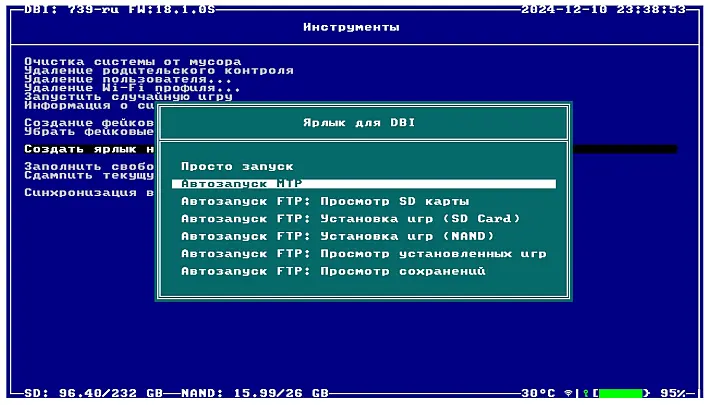
The tool also acts as an installer while supporting installation via MTP, USB (with DBI backend script or dbi-nsw tool), http (from its own server), from external USB devices and more.
The MTP mode allows users to connect the Switch console to the PC, so the desired files can be “copied” on the virtual MTP device, waiting to be installed.
The update fixed a bug related to SD cached save operations. New features have been introduced, including support for multi-thread HTTP downloads in title mode and automatic encoding detection for formats such as Windows-1251, CP 866, KOI-8, IBM855, ISO/IEC 8859-5, and MacCyrillic.
In addition, the performance of the text editor has been optimized, making it more efficient.
Characteristics of
- Install the NSP, NSZ, XCI, and XCZ files.
- It supports installation on MTP, USB, http (from personal server), external USB and more.
- Displays images in jpg, png and psd formats and works with zip and rar archives, as well as with cbr/cbz containers.
- Displays text files in plain text or hexadecimal format.
- File manager that can copy, move, or delete files and folders, or create new folders.
- Saving manager (including backup and restore).
- View task charts in games based on dates for all users available for each specific game.
- .. and more.
Installation
- Download and copy the file
dbi.nroand and the filedbi.configon the SD card, placing them insdmc:/switch/DBI/. . - Next, you can start DBI both in applets mode (through Album) mode and in application mode (replaced the title). However, it is important to note that the application is primarily designed to be used in applets mode.
- Successful start of DBI in applet mode will be indicated by a blue background, while the start in application mode will be highlighted by a black background.
Interface
- Browse SD Card
- Install NSP/NSZ/XCI/XCZ files from memory card.
- Browse USB0 Drive
- Install NSP/NSZ/XCI/XCZ files from an ex-USB USB drive, such as a USB stick, hard drive, etc.
- Install title from DBIbackend
- Install NSP/NSZ/XCI/XCZ files from a PC via USB 2.0 or 3.0 cable using the included dbibackend program (Scorcio for this option: Button Y).
- Install title from Gamecard
- This option appears when a game card is inserted into the Switch and allows you to install a game from the game card to the microSD card or the internal NAND memory of the console.
- Home server
- Starting with version 150, you can install games over the network (HTTP) via wireless WiFi or a LAN-USB adapter. Further details here.
- Browse installed applications
- View installed games, the total number of games installed, the time spent on a game and the number of times it has started, checks errors, transfers game data between internal memory, memory card, selectively deletes or continuously games and LayeredFS mods, displays the presence of updates and DLC, manually removes DLC/updates/mod LayeredFS (LFS) and the Reset function of the version Request to restore the control of the update.
- Cleanup orphaned files
- Automatic cleaning of unnecessary deleted game files, if any.
- Browse tickets
- View and manually delete the game system tickets.
- Browse saves
- View and erase game saves.
- Run MTP responder
- Enables internal MTP server to connect the
- Run FTP server
- Enables the DBI FTP server to access microSD files via the 5000 port or install files via port 6000.
- Exit
- Close the program (Scorheia for this option: Button +).
The lower left corner of DBI shows the total amount of data currently on the SD card along with the total capacity. The lower right corner provides the same information for usable space in the NAND of the Switch (HOS) operating system.
In the middle below (dbi: XXX) instead indicates the version number of DBI: It is recommended to keep the program up to date.
Commands
General:
Browse SD card/USB0 Unity:
- – Open the folder, Confirm/Starti install.
- – Back.
- – Select individual or multiple files for installation.
- – Reverse your selections (the color of the name of the selected files will change from white to light blue).
Changelog
Corrections
- Fixed a bug related to SD cached save operations.
Added
- Support for multi-thread HTTP downloads in title mode.
- Automatic coding detection for Windows-1251, CP 866, KOI-8, IBM855, ISO/IEC 8859-5 and MacCyrillic.
Optimizations
- Improve the performance of the text editor.
Download: DBI v749 (RU)
Download: DBI Backend (exe) (tar.xz)
Download: dbi.config
Download: Source code DBI v749
Source: github.com