
PC ezRemote Client is a simple file management tool designed for Linux devices and optimized for use with controllers.

This software allows connection to a wide range of remote servers, including FTP/SFTP, SMB (Windows Share), NFS, WebDAV and HTTP (such as Apache, Nginx, IIS, RClone).
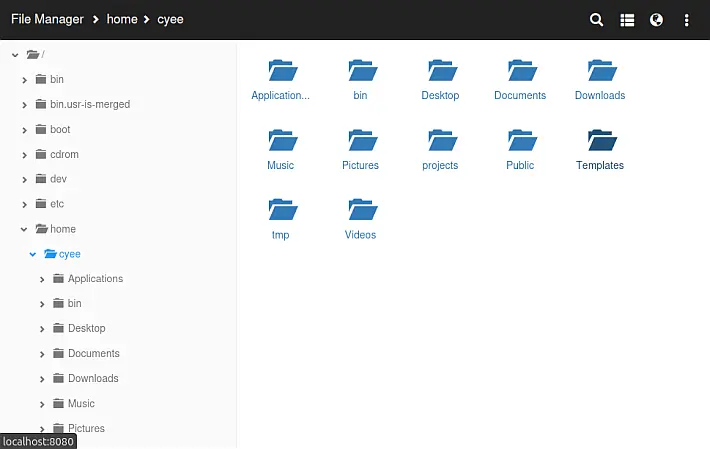
It also offers integration with platforms like Archive.org and Myrient to facilitate file transfer. The interface, inspired by the well-known Filezilla client, offers a visual configuration in “commander” style that makes the management intuitive and accessible.
Characteristics of
- Multi-protocol support:
- Connections with FTP/SFTP, SMB, NFS, WebDAV (including WebDAVs) and HTTP(S) servers.
- Compatibility with cloud hosting services such as AWS S3, Azure Blob, and Google Storage via WebDAV.
- Advanced file management:
- Creating, copying, moving, renaming, deleting files and folders.
- Compression in ZIP files and extraction from ZIP, RAR, 7zip, TAR and TAR.GZ formats.
- Filezilla inspired user interface:
- Intuitive navigation for local and remote files.
- Compatible with controller and touchscreen, optimized for Steam GameScope mode.
- Additional functionality:
- Download files from web servers with HTML directory lists (Apache, Nginx, IIS).
- Integration with services like All-Debrid and Real-Debrid.
- Support for image viewing, editing text files, and archive management.
- Access via web interface:
- Possibility to control the application from a browser via the address
http://<ip_dispositivo>:8090, configurable in the settings.
- Possibility to control the application from a browser via the address
- Multi-language translation:
- Support for more than 30 languages, including Italian, English, French, Spanish and Chinese.
Limitations
The application, while offering extended features, is described as a hobby project, with some limitations:
- Single-threaded: Allows one operation at a time.
- Lower performance than professional clients, especially for simultaneous.oti downloads.
Guide
To distinguish between FTP, SFTP, SMB, NFS, WebDAV or HTTP, the URL must be preceded by ftp://, sftp://, smb://, nfs://, webdav://, webdavs://, http://or, or, https://. .
URL format for FTP/SFTP
ftp://hostname[:port]sftp://hostname[:port]
- hostname may be the text host name or an IP address. This is mandatory.
- port is optional and predefined at 21 (FTP) and 22 (SFTP) if not specified.
For SFTP, you can use ID files. Place both files id_rsaand and id_rsa.pubin the same folder. In the user interface password field, instead of entering a password, indicate the folder where the files are.
Before “file” to the folder path and do not password protect your ID files.
Example: If the files are placed in the folder /home/user/.ssh, enter in the password field file:///home/user/.ssh
URL format for SMB (Windows Network Sharing)
smb://hostname[:port]/sharename
- hostname may be the text host name or an IP address. This is mandatory.
- port is optional and predefined at 445 if not specified.
- sharename is mandatory.
URL format for NFS
nfs://hostname[:port]/export_path[?uid=<UID>&gid=<GID>]
- hostname may be the text host name or an IP address. This is mandatory.
- port is optional and predefined at 2049 if not specified.
- export-path is mandatory.
- uid is the UID value to use. Default to 65534 if not specified.
- gid is the GID value to use. Default to 65534 if not specified.
The special characters in pathto be encoded using syntax %-hex-hex. .
For example:
nfs://192.168.0.1/my?path?uid=1000&gid=1000
must be codified as:
nfs://192.168.0.1/my%3Fpath?uid=1000&gid=1000
Format URL for WebDAV
webdav://hostname[:port]/[url_path]webdavs://hostname[:port]/[url_path]
- hostname may be the text host name or an IP address. This is mandatory.
- port is optional and predefined at 80 (WebDAV) and 443 (WebDAVS) if not specified.
- url-path is optional according to the requirements of the WebDAV server.
URL format for HTTP Server
- hostname may be the text host name or an IP address. This is mandatory.
- port is optional and predefined at 80 (HTTP) and 443 (HTTPS) if not specified.
- url-path is optional according to the requirements of the HTTP server.
For Internet Archive Repositories
Only supports the analysis of the download URLs (i.e. the URL where the list of files is visible).
For example:
archive_org_screen1 archive_org_screen2 image
For Myrient
Enter the following URL in the server field: https://myrient.erista.me/files
Tested with the following WebDAV servers
- Recommended: Dufs – To host your WebDAV server.
- Rclone
- SFTPgo – For local WebDAV servers. It can also be used as a WebDAV frontend for cloud storage such as AWS S3, Azure Blob or Google Storage.
- box.com (Note: Delete folders does not work. This is a box.com and not an app issue).
- mega.nz (through the megacmd tool).
- 4shared.com
- drivehq.com
Functionality of the application
- File management/transfer between FTP/SFTP/SMB/NFS/WebDAV/HTTP server.
- Support for HTTP servers with lists of HTML directories for downloading files.
- List and download files from Archive.org and Myrient.
- Creation of ZIP files.
- File extraction ZIP, 7zip, RAR, TAR, TAR.GZ.
- File management functions: size/copy/paste/rename/delete/new folder/new file.
Functionality in the Web Interface
- Copy/Move/Delete/Rename/Create files and folders.
- 7zip, RAR and ZIP file extraction.
- Compression files in ZIP directly.
- Edit text files.
- Displaying all common image formats.
- Loading files.
- Download files from URLs directly or through All-Debrid and Real-Debrid.
Access to the web interface
Launch the app “ezRemote Client”. On any device (laptop, tablet, phone, etc.) with browser, access http://<ip_address_of_device>:8090
The port can be changed from the “Global Settings” dialog. Any changes to the web server settings require a reboot of the application.
Gamepad checks
Keyboard controls
- Space : Select Button/Single of text.
- Esc: Uncheck the file list or close a dialog box.
- Alt : Menu (after the selection of files/folders).
- Enter : Multiple selection file.
- Ctrl-1 : Navigate to the local file list.
- Ctrl-2 : Navigate to the remote file list.
- Backspace : Return to the top directory.
- Ctrl-Q : Exsces the application.
Multilingual support
The app supports the following languages (translations may not be complete for some of them):
- Dutch
- English and English
- French
- German
- Italian
- Japanese
- Korean
- Polish
- Portuguese-BR
- Russian
- Spanish and Spanish
- Simplified Chinese
- Traditional Chinese
- Arabic
- Catalano
- Croatian
- Euskera
- Galego
- Greek
- Hungarian
- Indonesian
- Romanian
- Ryukyuan
- Thais
- Turkish
- Ukrainian
- Vietnamese
Note: To contribute to translations, download this template, make changes and send a problem with the attached file.
Changelog
- Updated to the latest version of the ImGui library.
- Improved detection of the game controller.
Download: PC ezRemote Client v1.02
Download: Source code PC ezRemote Client v1.02
Source: github.com