
A new update for PFS BatchKit Manager has its new update, the tool allows us to easily manage the hard drive of the PlayStation 2 console.
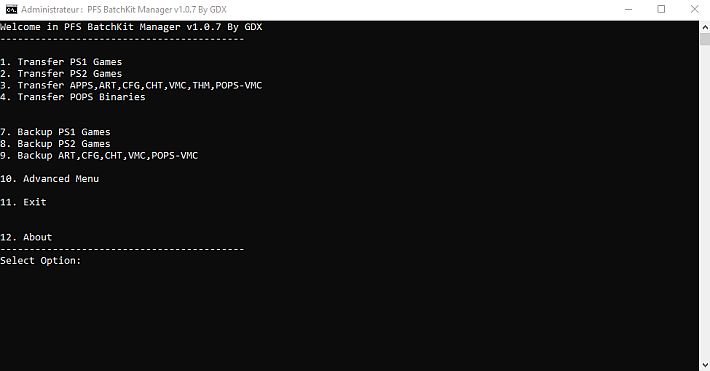
The script is designed to help beginners in the correct hacking of the PS2 console hard drive and downloading their games from CD-ROM or DVD-ROM.
The tool also includes a CRC32, MD5 and SHA1 scan to check the corresponding values in the most recent redump database.
If the ISO image matches the database, the tool will rename it with the same name found in the database itself.
The tool’s HDD menu also offers many other useful features, such as the PS2 hard drive hacking via file injection MBR.IMGo temporary start of wLaunchELF to correctly format the hard disk.
Among the most important innovations, it has been added the ability to create shortcuts for PS1 games directly in OPL, with support for use via USB or HDD.
During the installation, a control of the available space in the POPS partitions was introduced, to prevent the files being transferred in case of lack of space.
In addition, the conversion of 8-bit color game covers has been implemented, which reduces RAM consumption and improves image loading into OPL.
Another important addition is support for the generation of cheat files for PS1 games in .bin/.cue format, as well as the creation of CRC ELF hash during the generation of these files.
The shortcut management for PS1 games has been optimized: by renaming or deleting a game, the associated shortcuts in OPL are updated automatically.
The update also expanded support for USB devices, introducing features for managing ART, CFG, and POPS files.
Significant improvements concern the transfer speed of PS2 games thanks to the integration of hdl-serv, which offers superior performance compared to the previous NBD server, although the latter remains recommended for file transfer.
In addition, an automatic detection of OPL resource partitions was introduced, allowing users to choose which partition to use to store ART, CFG, CHT, and other game resources.
The software also also supports PS1 educational games with LSP identifiers, making it compatible with the PSX DESR V1 partitioning scheme.
Tools have been introduced to display the space used and remaining in the POPS partitions, as well as the ability to add a prefix to application titles in the OPL configuration.
The update also includes new downloadable applications, such as Apollo Save Tool Management, and has improved the user interface, providing detailed information about the hard disk status, available space, and currently loaded resource partition.
In addition, the database of PS1 and PS2 games has been enriched, now available in several languages (English, French, German, Spanish, Italian and Portuguese).
In terms of optimizations, the code has been rewritten in some parts to improve efficiency, while the menu has been reorganized to make navigation more intuitive.
Some issues have been fixed, such as those related to installing PS2 games with multiple tracks and managing game descriptions that exceed 255 characters in configuration files, which previously could cause OPL to be blocked.
Finally, the management of the partitions and the updating of the resources associated with the games have been improved.
How to Hack the PS2 Hard Drive
Important: If you have already formatted and installed FreeHDBoot (HDD), you don’t need to follow these steps.
- In PFS BatchKit Manager joining
Advanced menu’’’’’’HDD Management. . - Choose the option 8
Hack your HDD To PS2 Format. . - After performing the hack, insert the HDD into the PlayStation 2 and format the hard drive with wLaunchELF In wLaunchELF
FileBrowser’’E’MISC’’E’HDDManager’’E’Press R1’’E’Format and confirm. . - Copy the contents of the folder
COPY_TO_USB_ROOTinside the USB drive. - Install FreeHDBoot (HDD). In wLaunchELF
FileBrowser’’’’’Mass’’’’’APPS’’’’’FreeMcBoot’’’’’FMCBInstaller.elf, press to start . .
Press R1’’’’’Install FHDB(from HDD). - After these simple steps, the hard drive will be formatted and hacked properly.
 to start . .
How to install games for PS2
Note: Before installing the games, it is strongly recommended to create the +OPL partition.
- Copying the images
.BIN/ /CUEin the folderCD. . - Copying the images
.ISOin the folderDVD. .
How to install games for PS1
Copying the file .BIN/ / CUEin the folder POPS. .
- Transfer to POPS-Binaries.
- Go on
Conversion menu. . - Choose
Convert .BIN/CUE in .VCD. . - Creating a partition
__.POPSChoose an appropriate size based on the number of games you want to install - Transfer your own file
.VCD. .
How to Configure the HDD-OSD
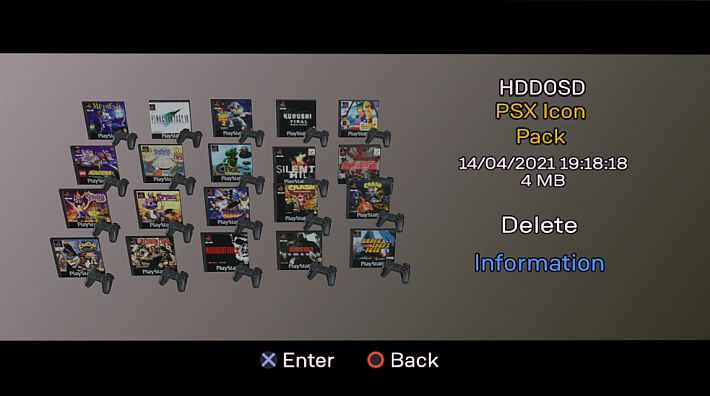
- Install FreeHDBoot (HDD).
- Creating the partition
+OPL. . - Install HDD-OSD.
- Install your own game.
- Inject the
MiniOPL(for games you want to run from HDD-OSD).
FAQ
Question: What is it TROJAN_7.BIN
Answer: TROJAN_7.BINis a patch for PS1 games that fixes some bugs. The patch can be found at this address.
Changelog
- Added an option to create shortcuts for PS1 games in OPL for USB/HDD.
- Added free space control in POPS partitions during installation. If there is no more space in one of the partitions, the file will be ignored or transferred to another partition
__.POPS#. . - Added the option to convert ART covers to 8-bit colors to improve loading into OPL and reduce RAM consumption (thanks Ripto for the tip).
- Added the hash CRC ELF during the generation of cheat files.
- Added the cheat file generation for files
.bin/ /.cue. . - Added that renames or deletion of PS1 games will also update the shortcuts in the OPL partition.
- Added functionality for USB devices (ART, CFG, POPS and more).
- Added
hdl_servfor installing PS2 games, with a better transfer rate than NBD Server (although the latter is recommended for file transfer). - Added the automatic detection of OPL resource partition. The partition
__commonwill be set as default if the +OPL partition does not exist. - Added the ability to change the partition of OPL resources, allowing users to specify the default partition to store ART, CFG, CHT, etc.
- Added
UPSX_SIDto replace the old PS1 identifier for greater accuracy. - Added full support for PS1 educational games with LSP serial identifier (compatibility with PSX DESR V1 partition scheme).
- Added information on POPS partitions about the remaining and used space.
- Added the ability to add a prefix for applications in
title.cfg. . - Added new downloadable applications (Apollo Save Tool Management).
- Added information about the HDD in the menus (total space, used, free and currently loaded resources partition).
- Added multiple PS2 icons for HDD-OSD (4778 PS2 icons).
- Added record of errors for uninstalled games.
- Added the choice of output path for PS2 game extraction.
- Added the ability to delete PS2 games.
- Added a great new database of PS1 and PS2 games with game information in multiple languages (En, Fr, De, Es, It, Pt).
- Added that, when creating shortcuts for PS1 games, the game information will be automatically added to the CFG file.
- Added the settings menu with the selection of the database languages.
- Added the ability to empty any partition (uncleing only all files on the partition).
- Added the full PS1 database, PS2, APP in XML format.
- Fix PS2 games extraction if the zso format is detected.
- Fixed PS2 games installation problems with multiple tracks (e.g., Dynasty Warriors 2).
- Fix the shortcut names of PS1 games on the OPL APPS tab, removing the game ID from the name.
- Fixed the problem of game descriptions that exceeded 255 characters in CFG (OPL files could crash randomly).
- Fixed partition detection.
- Fixed the problem when creating
title.cfg: Now check if it exists and does not overwrite it, but only changes the title and boot. - Fixed game titles that were not updated when updating the partition resources.
- Fixed Infos.sys background color when upgrading partition resources.
- Fixed page error
Manual.xmlby PSBBN with title names containing “&”. - Optimized the script by rewriting parts of the code.
- Reorganized the menu to improve navigation.
- Moved the injection function of the OPL launcher into the header of the update partition.
- Move the HDL partition conversion function for PSBBN & XMB to the update partition header.
- Rewritten conversion files from scratch.
- Rewritten from scratch the downloads of ART.
- Rewritten from scratch the installation of PS1 games for HDD-OSD, PSBBN and XMB.
- Re-written from scratch the installation of PS1 games for
__.POPS#. . - Rewritten from scratch the creation of shortcuts for PS1 games.
- Updated the title database for PS1 and PS2 (the PS1 database now has the LightSpan LSP IDs).
- Updated the link for the download of ART (from September 2024).
- Removed the CD-DVD path during the installation of PS2 games.
- Removed POPS-VCD-Extractor.
- Removed ECM conversions.
- Removed the CHD conversions.
Download: PFS BatchKit Manager v1.1.9
Download: Source code PFS BatchKit Manager v1.1.9
Source: github.com