
Bạn đang cập nhật Firmware cho PS3 thì bỗng nhiên máy dừng lại ở khoảng 40% – 70% và báo lỗi 8002F14E? Dù bạn khởi động lại bao nhiêu lần, máy vẫn tự động quay lại màn hình cập nhật và tiếp tục báo lỗi? Đừng quá lo lắng, đây là lỗi kiểm tra phần cứng của Sony, và chepgame.net sẽ hướng dẫn bạn cách thoát khỏi “vòng lặp tử thần” này.
1. Nguyên nhân gây lỗi 8002F14E
Trong quá trình cập nhật System Software, PS3 sẽ thực hiện một quy trình kiểm tra các linh kiện ngoại vi quan trọng. Nếu hệ thống không tìm thấy hoặc không kết nối được với ổ đĩa Blu-ray (BD Drive) hoặc Card Wifi/Bluetooth, nó sẽ dừng cập nhật để bảo vệ máy.
Lỗi 8002F14E cụ thể thường liên quan đến việc ổ đĩa Blu-ray:
- Mất nguồn hoàn toàn: Không có điện cấp vào ổ đĩa.
- Lỏng cáp tín hiệu: Cáp dẹt (ribbon cable) bị lệch hoặc đứt ngầm.
- Hỏng cầu chì trên Mainboard: Các cầu chì bảo vệ đường 12V/5V cấp cho ổ đĩa bị cháy.
2. Các bước kiểm tra và khắc phục lỗi phần cứng
Bước 1: Kiểm tra lại các kết nối cáp
Đây là nguyên nhân phổ biến nhất. Bạn cần tháo máy và kiểm tra:
- Cáp dẹt lớn (Data Cable): Đảm bảo cáp được cắm chắc chắn vào cả hai đầu (Mainboard và ổ đĩa). Nếu thấy đầu cáp bị trầy xước lớp đồng, hãy cắt bỏ 1mm đầu cáp hoặc thay cáp mới.
- Cáp nguồn nhỏ (Power Cable): Sợi dây 4-pin cấp nguồn cho ổ đĩa phải được cắm chặt.
Bước 2: Kiểm tra cầu chì (Fuses) trên Mainboard
Nếu cáp vẫn tốt nhưng ổ đĩa không có dấu hiệu hoạt động (không hút đĩa, không sáng đèn), khả năng cao là cầu chì trên bo mạch chủ đã đứt.
- Sử dụng đồng hồ vạn năng (Multimeter) đo thông mạch các cầu chì ký hiệu là F6001, F6002 (trên các dòng Slim).
- Nếu cầu chì chết, bạn cần hàn thay thế hoặc “nối tắt” (không khuyến khích nếu bạn muốn bảo vệ máy lâu dài) để cấp lại điện cho ổ đĩa.
3. Giải pháp phần mềm: “No-BD” Firmware (Dành cho máy Hack)
Nếu ổ đĩa của bạn đã hỏng hoàn toàn và bạn không muốn tốn tiền sửa chữa, bạn có thể sử dụng giải pháp No-BD Patch.
- Cách làm: Bạn cần tháo ổ cứng (HDD) của PS3 ra, format trên máy tính để thoát khỏi vòng lặp update. Sau đó, cài đặt bản Custom Firmware (CFW) bản No-BD (như Evilnat No-BD).
- Kết quả: Bản Firmware này đã được chỉnh sửa để bỏ qua bước kiểm tra ổ đĩa Blu-ray khi khởi động và cập nhật, giúp máy hoạt động bình thường mà không cần ổ đĩa.
4. Lưu ý quan trọng
- Tuyệt đối không tháo ổ đĩa ra khi đang update: Điều này chắc chắn sẽ dẫn đến lỗi 8002F14E.
- Kiểm tra cả Card Wifi: Đôi khi lỗi này cũng xuất hiện nếu module Wifi/Bluetooth bị hỏng (thường đi kèm với lỗi 8002F1F9).
Thông tin tóm tắt cho SEO:
- Tiêu đề bài viết (Title Tag): Cách sửa lỗi PS3 8002F14E: Thoát vòng lặp Update thành công 100%.
- Từ khóa chính (Keywords): lỗi ps3 8002f14e, fix update loop ps3, sửa ổ đĩa blu-ray ps3, firmware no-bd ps3, cầu chì nguồn ổ đĩa ps3.
- Mô tả ngắn (Meta Description): Hướng dẫn xử lý triệt để lỗi 8002F14E trên PS3 khi cập nhật Firmware. Cách kiểm tra cáp, cầu chì nguồn ổ đĩa và giải pháp cài Firmware No-BD để cứu máy.
Lời khuyên từ Admin Super Mạnh: Nếu bạn đang gặp lỗi này và không có sẵn đồ nghề đo đạc, hãy thử rút cáp ổ đĩa ra vệ sinh bằng cồn 90 độ rồi cắm lại thật chặt. Đôi khi chỉ một chút bụi bẩn ở chân cáp cũng khiến hệ thống “từ chối” nhận diện ổ đĩa đấy!
Bạn có muốn mình tìm sơ đồ vị trí các cầu chì F6001/F6002 trên các đời mainboard PS3 Slim khác nhau (như DYN-001 hay JTP-001) để bạn dễ dàng đo đạc không?


PS3 Specs
1tb SSD
Tantelizers
Has new quality Replacement Caps for the Motherboard, PSU and the BD Drive
Delided
I’m very familiar with tech repair and soldering and repair a bunch of other systems in my spare time. No broken traces, no cold solder.
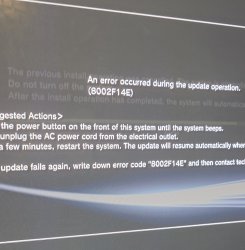
Evil Nat CFW and now it’s stuck on the latest update for Evil Nat that I attempted to install to see if that would fix the BD Drive, but instead I get error 8002fe14e every time it gets to 75% of the installation.
Hi thought I make this post about my A01 PS3 that no longer has a functional Blu Ray Drive, and I’ve tried everything to try and fix this fault going down the rabbit hole of trying various repair attempts and scrolling through old forum posts. But nothing seems to fix this fault, it looks like this fault is more complicated than I thought. And it looks like it’s pointing towards the motherboard. I’m now stuck on the update installation for the latest Evil Nat CFW giving me an 8002fe14e error at 75%. And now my BD Drive has a disc stuck inside, and it looks like it’s not getting any power, no blue light, no eject.
Before it used to take in discs, but it would not read any discs, but now it doesn’t function at all. I made a mistake of tearing down my PS3 a bunch of times causing more wear to the BD FPC Connector and the ribbon cable that plugs into it. I got into PS3 too early, trying various different fixes first it was the Delid, then the Tantalum Caps, then new Thermal Pads, then the Tantelizers. In comparison to my A01. My B01 that I recently aquired has also been Recapped with CFW, Tantelisers, Delid and that unit works perfectly. The BD Drive is fully functional and that’s because I didn’t take it apart as many times and was extra careful with it, the FPC Cables and the connector is in great shape. But my A01 is another story.
My PS3 was originally bought boxed fully working from Japan, I was able to Delid it, install CFW and with a 1tb SSD. It used to work perfectly, but then when I took it apart for NEC Tokins replacements along with thermal pad replacements. And with the amount of times i took apart my PS3 sometimes having to reapply the thermal paste for better temps. The 60 pin Blu Ray Drive Connector on the motherboard would start to wear out every time. I opened up my unit to the point where the latch completely broke off.
Where I would reinsert it, and the 60 Pin Blue FPC cable would also start to wear out more, with the blue tabs eventually breaking off. It got to the point where the BD Drive stopped functioning, where a game would crash at a certain point, and then all of a sudden my BD Drive would not detect discs, no PS2 discs, PS1 games, PS3, DVD, BD, CD’s nothing. At first I thought my BD Drive failed. So I took a known working one from 80gb unit, along with replacement FPC Cable and remarried the replacement, that didn’t fix it. I then I kind of gave up and used Webman for playing my games off an SSD.
Then I wanted to take another shot at repairing the BD Drive since a non working disc drive just bothers me. I bought a new laser for the replacement BD Drive and that didn’t fix it. I replaced the BD Drive board and that didn’t fixed it. I then took it out and remarried the BD Drive to my working B01 unit and the BD Drive along with its board worked perfectly. This then pointed towards it either being a software fault or a motherboard issue. So i tried going the software route by remarrying the drive again, and messing around with the CFW settings which didn’t work to eventually reinstalling the firmware where I now have this 8002fe14e fault.
And replacing the FPC connector with a quality replacement 60 FPC Connector and that didn’t fix it and I tried replacing the FPC connector with different 60 pin FPC Connectors, 3 times checking over my solder work and nothing. I even went as far as replacing the 0402 resistors near the BD Connectors using the schematics to identify them and that didn’t fix it. I also blew some fuses near by TH3204, TH2501 and TH3203 likely caused by me plugging in damaged Ribbon cables into the connectors over and over which most likely may have caused those fuses to blow. So I took the fuses out of a 80gb non backwards compatible PS3, that I plan getting it’s 65nm RSX extracted from via a BGA repair service to repair another E01 PS3. But that’s besides the point. I got the fuses off of my parts unit, along with another 60 pin FPC Cable, and it’s back to the same 8002fe14e error code always getting stuck at 75%.
Going through all of this mess. I came to the realisation that circuitry, most likely an IC Chip that communicates with the BD Drive on the Motherboard maybe fried, and I don’t know much about where such an IC chip could be on the motherboard. Unless I killed my BD Board which I highly doubt since it’s a remarried replacement. My PS3 definitely needs to be investigated and probed out, perhaps with an Oscilloscope since I can’t figure out why this fault is occuring despite me replacing the BD Drive, Board, 60 pin FPC Connector on the motherboard along with the FPC Ribbon Cable and the nearby resistors on the motherboard. Nothing seems to work.
This is how I replaced the FPC Connectors and the Resistors. Most of this was just a waste of time.If anyone understands how the original PS3’s motherboard communicates with the Blu Ray drive, I would love to know and see what the specific fault is on my PS3. It most likely that my PS3 just isn’t communicating with the BD Drive.
I also tried swapping the network/bluetooth board since I heard that can also cause this error but swapping the network board doesn’t fix this error for me and my BD Drive continues to not function. Everything 100% is pointing towards a fault on the motherboard. Now I could try formatting the SSD or rebuilding it’s database, but my main focus of this thread is to get the BD Drive working and figure out where the exact fault is for the BD Drive not communicating with the motherboard.


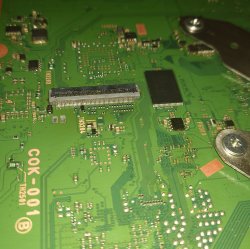


I thought I insert this schematic for a reference, i can’t seem to find a Blu Ray IC on the motherboard.
Is the fault with one of these chips below.
Source: https://www.psdevwiki.com/ps3/Bluray_Drive
“The Blu-ray drive is controlled by a Sony Digital Signal Processor chip (CXD6350GG-1, CXD5063AGG-1, CXD5065GB-1, CXD5065-1 depending the SKU) and a Sony CXA2720R Front End Processor chip. Motors/coils are driven by Rohm BA5888FP (Laser Driver – Tracking/Focus Coils driver) and Rohm BD7956FS (Motor Driver – EXP-Motor coils/sled/slot motor driver), of which the Laser Driver uses an OPAMP NJM13403V for Tracking/Focus CTRL.”